Proxy not working? A diagnostic checklist for connection failed and refused errors
Proxy connection failed, refused or timing out? Test your network without the proxy, then host and port, protocol, login and allowlist, the target site and your app's route.
Proxy not working: a diagnostic checklist
Your browser shows ERR_PROXY_CONNECTION_FAILED, a script throws "connection refused", or pages spin until they time out. Swapping proxies at random rarely fixes it. Each failure leaves a signature that points to the part of the route that broke: your own network, the proxy's port, the protocol or login, or the site behind the proxy. This checklist goes through those parts in order and shows the exact errors we reproduced on a local test setup.
01Step 0: check your connection without the proxy
Turn the proxy off in the app that fails and open the same site. If it fails without the proxy too, the proxy is not your problem yet. Fix the Wi-Fi, DNS or the site outage first, because every later test assumes a working base connection.
If the site opens directly, write down two things while the proxy is still off. The first is your public IP from What is my IP, both IPv4 and IPv6 if you have them. You will need it if your proxy account authorizes by IP. The second is anything sitting between you and the internet: an office proxy, a VPN, or antivirus features called web protection or HTTPS scanning. HTTP Toolkit's article on ERR_PROXY_CONNECTION_FAILED traces stubborn cases of that Chrome error to antivirus software that intercepts the connection to the proxy and then drops it.
With a clean baseline, every failure from here on belongs to the proxy route.
02Read the error: where did the request stop?
A proxied request has two hops. Hop 1 runs from your app to the proxy. Hop 2 runs from the proxy to the site. Almost every error message belongs to one of them, and the placement tells you what to fix.
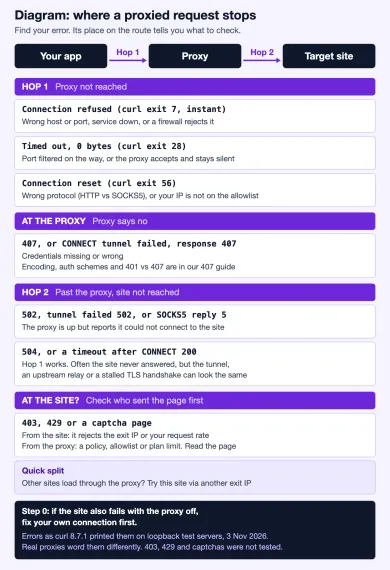
We reproduced the hop 1, proxy and hop 2 rows of the table on 3 November 2026 with toy servers bound to 127.0.0.1 on a Mac: an HTTP proxy with and without a password, a SOCKS5 proxy, a proxy with an IP allowlist, a test site, a port with nothing listening, and a listener that accepts connections and never replies. The client was curl 8.7.1, plus Python's built-in urllib for two checks. Nothing left the machine, so real packet loss on a network was not part of it, and neither were 403, 429 or captcha pages: that last row comes from how sites and proxies commonly respond, not from our lab. The table shows how a client reports each failure. It says nothing about how a particular provider's proxy behaves.
| What curl printed in our lab | Where it stopped | What it usually means |
|---|---|---|
Failed to connect ... Couldn't connect to server (exit 7), in under 10 ms | Hop 1, proxy not reached | Nothing listens on that host and port, or a firewall rejects the connection |
Operation timed out ... with 0 bytes received (exit 28) | Hop 1 | The port accepts connections but nothing answers, or packets get dropped |
Connection timed out (exit 28) when we spoke SOCKS5 to an HTTP proxy port | Hop 1 | Protocol mismatch: the HTTP proxy waited for a request it never got |
Recv failure: Connection reset by peer (exit 56) | Hop 1 | We got this twice: HTTP sent to a SOCKS5 port, and an allowlist proxy hanging up on an unlisted IP |
407 Proxy Authentication Required, or CONNECT tunnel failed, response 407 | At the proxy | Credentials missing or wrong |
502 Bad Gateway, CONNECT tunnel failed, response 502, Can't complete SOCKS5 connection ... (5) | Hop 2 | The proxy is up and reports that the target refused its connection |
504 Gateway Timeout, or a timeout after the tunnel opened | Hop 2 or inside the tunnel | Hop 1 works; often the target never answered, but an upstream relay or a stalled TLS handshake looks the same |
| 403, 429 or a captcha page (not tested in our lab) | At the site, or at the proxy | If the site sent it, it rejects the exit IP or your request rate; a proxy can send its own 403 or 429, so check who sent it first |
Browsers squeeze all of hop 1 into one message. Chrome says ERR_PROXY_CONNECTION_FAILED, Firefox usually says "The proxy server is refusing connections", for most of these causes alike. To see which row you are in, repeat the request from a terminal with the same proxy details:
curl -q -v --noproxy '' --connect-timeout 10 --max-time 30 \
  -x http://HOST:PORT https://example.com/
Replace http:// with socks5h:// for a SOCKS5 proxy. Our curl proxy guide covers the flags. The curl manual documents these proxy and timeout options. The first option, -q, ignores curl defaults; --noproxy '' prevents an environment bypass from invalidating this diagnostic. Verbose logs can contain credentials and cookies: redact them before sharing. Use protected credential input for real passwords.
03Is the proxy host and port reachable?
Refused and timed out sound alike, but they mean different things. A refusal is an answer. Something at that address said no, fast. In our lab curl gave up on the closed port in 0 ms of connect time and printed exit code 7. A timeout is silence. Our listener that accepted the connection and never replied kept curl waiting until its 4-second limit, then curl reported 0 bytes received.
Typical reasons for a refusal:
- A typo in the host or port, or a port copied from the wrong list. Many providers use different ports per protocol, country or session type.
- An outdated endpoint list. Webshare's troubleshooting page names an outdated proxy list as the first configuration issue to check, since tools that load a saved list keep calling proxies that were replaced.
- The proxy service is down, or your own firewall rejects outbound connections to that port.
Typical reasons for a timeout are a corporate or hotel network that silently drops unusual ports, a cloud server whose outbound rules block the port, or a proxy that is overloaded. A quick way to split those apart is to test the same endpoint from another network, such as a phone hotspot. If it connects there, your network blocks it.
You can test the port without any proxy logic. On macOS or Linux run nc -vz HOST PORT. On Windows PowerShell run Test-NetConnection HOST -Port PORT. A successful TCP connect only proves something listens there. Any HTTP reply, even an error page, proves more: a server on that port understood your request. If the hostname itself does not resolve, curl says Could not resolve proxy (exit 5), which points at DNS or a misspelled host.
04Protocol, login and allowlist
Once the port answers, three settings decide whether the proxy accepts you.
Protocol first. An HTTP proxy and a SOCKS5 proxy speak different languages on the wire, and neither reports "wrong protocol" in plain words. When we pointed a SOCKS5 client at our HTTP proxy port, the proxy waited for an HTTP request that never came and curl timed out after 5 seconds. When we sent HTTP to the SOCKS5 port, the SOCKS server saw the letters "GE" instead of a SOCKS greeting and hung up; curl reported a reset within 12 ms. Both look like a broken proxy. Check the scheme in your proxy URL against the protocol your provider lists for that port. Our comparison of SOCKS5 and HTTP proxies explains which apps need which.
Login second. A 407 is good news of a kind: hop 1 works, and the proxy is asking for credentials it did not get or did not accept. Our lab proxy logged what arrived. The first two requests carried no Proxy-Authorization header at all. The third carried one with a wrong password. Both got the same 407. For https:// sites the 407 arrives in reply to the CONNECT request, so curl prints CONNECT tunnel failed, response 407 and many libraries wrap it in a generic proxy error. Password encoding, auth schemes and the 401 vs 407 difference are covered step by step in our guide to 407 Proxy Authentication Required.
Allowlist third. Many providers let you authorize by your IP address instead of a password. When that IP changes, after a router restart, a switch to mobile data or a move to a server, the proxy stops recognizing you. Providers answer that in different ways: some send 407, some 403, some just close the connection. Our allowlist proxy closed it, and curl printed Connection reset by peer, the same words we got for the protocol mismatch. So if a reset starts right after your network changed, compare the IP you wrote down in step 0 with the allowlist in your dashboard, including IPv6.
The account matters as much as the settings. An expired plan, used-up traffic or an unverified account stops proxies just as well as a wrong port. Look at the provider dashboard before you rewrite a working configuration.
05The proxy works, but the site does not
Past hop 1, failures belong to hop 2 or to the site. How visible they are depends on the request type.
For a plain http:// request the proxy fetches the page for you, so it can describe the failure with a status code. Our lab proxy answered 502 Bad Gateway when the target port was closed, and 504 Gateway Timeout when the target accepted the connection and stayed silent for 2 seconds. Real proxies pick their own codes; 503 is also common.
For https:// the proxy builds a tunnel with CONNECT, and only the tunnel's setup gets a status. If the target refuses, you still see it: curl printed CONNECT tunnel failed, response 502. If the target accepts and then never answers, the proxy has already said "200 Connection established" and is just passing bytes. Our test ran to curl's 4-second limit with 0 bytes received, word for word the same message as the silent proxy in the hop 1 test. The -v output separates them. If you see 200 Connection established, hop 1 is fine and the stall is somewhere past it. Often the site is not answering, but the same silence can come from inside the tunnel: an upstream relay in the provider's network that never connects, or a TLS handshake that stalls. Our lab only reproduced a silent target behind a plain-text tunnel, so treat this as the likely direction, not a verdict. Trying a second site through the same proxy narrows it down.
SOCKS5 proxies report hop 2 failures with a reply code. Curl printed Can't complete SOCKS5 connection to 127.0.0.1. (5), and code 5 means "Connection refused" in RFC 1928, the SOCKS5 specification.
A 403, a 429 or a captcha page usually means the whole route worked and the site rejected the exit IP or the request rate. Check who sent it first, though. Proxies send their own 403 or 429 for blocked destinations, allowlist misses or used-up traffic, often with the provider's name or plan wording in the page. Read the response body in curl -v or the browser before you blame the site. Our lab did not reproduce these pages. If the response does come from the site, two quick tests narrow it down. Load a different site through the same proxy; if that works, the proxy is fine. Then load the problem site through a different exit IP. Datacenter addresses get flagged more often than residential or mobile ones, so a site that blocks one datacenter range may accept a residential exit. Slow down before you blame the IP if you are sending many requests per second.
06Check the route your app actually uses
Two checks answer two different questions, and mixing them up is how people end up with a proxy that "passes" and still fails.
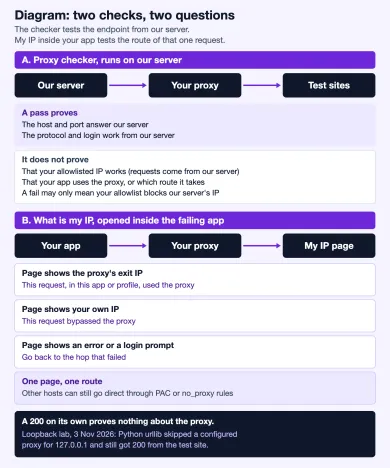
The proxy checker connects to your proxy from our server and reports whether it answers and which sites it reaches. A pass proves that the host, port, protocol and credentials work together. It does not test your IP allowlist, since the request comes from our server; with allowlist-only accounts it may be rejected for that reason alone. It also cannot see your app's settings.
The second check runs inside the failing app. Open What is my IP in the same browser profile or app. If you see the proxy's exit IP, that request, from that app or profile, went through the proxy. It does not prove that every destination does: a PAC file or a no_proxy rule can send some hosts direct, so check the app's bypass rules for the site that fails too. If you see the IP from step 0, the app bypassed the proxy. An error or a login prompt sends you back to the matching row of the table.
Bypass is easy to miss because the page loads fine. Our lab caught it twice. Curl used a proxy from the http_proxy environment variable until we added the target to no_proxy; then it went direct, got status 200, and the test site saw no proxy header. Python's urllib went further. On this Mac it skipped the configured proxy for 127.0.0.1 because of the system's bypass rules, so a proxy with a closed port and a proxy that demanded a password both seemed to work. The test site saw a direct request every time. A 200 on its own proves nothing about the proxy.
Common sources of a silent bypass are no_proxy or NO_PROXY variables, PAC files and "bypass for these hosts" lists, and desktop apps that ignore the system proxy entirely. Our guide on how to check if a proxy works goes deeper into leak checks, and the browser proxy setup guide covers per-browser settings.
07When the proxy itself is the problem
You have reached this point if the baseline works, the port answers, the protocol and login are right, and the plan is active, yet the proxy still fails in a test it should pass. A checker failure on its own does not settle that. If your account authorizes by IP, our server's address is not on your allowlist, and the checker's own network or test sites can have limits of their own. Repeat the test from a machine you have authorized, with curl -v against more than one site. If that fails too, the fault is likely on the provider's side. Send support the exact error text, the time, the endpoint host and port, the protocol and the IP you tested from, and ask them to check the endpoint. Leave the password out.
If the same endpoint keeps failing, compare providers. Top Proxy is a catalog: we compare proxy services and do not sell IPs ourselves.

SOAX sells rotating residential and mobile proxies on a shared credit pool, with datacenter and ISP in the same plans. Builder starts at $200/mo + VAT (200 credits); Tier 1 traffic is $3/GB on Builder.

Bright Data is a large proxy network for data collection: residential, mobile, ISP and datacenter IPs in about 195 countries. Residential traffic can be paid as you go with no subscription, and datacenter and ISP addresses come in packs from 10 IPs. Residential and mobile access requires identity verification.
08FAQ
Why does my proxy say connection refused?
What does ERR_PROXY_CONNECTION_FAILED mean in Chrome?
The proxy checker says my proxy works, but my app still fails. Why?
Is a timeout the proxy's fault or the website's?
Why does the proxy work in one app and not in another?
Should I disable my antivirus to fix a proxy error?
Related articles
How mobile proxies work: IP rotation and sessions
Why a site still remembers you after an IP change: what a mobile exit is made of, why carriers use CGN, the three kinds of "session", what rotation really changes, and what to check before renting.
Proxy bandwidth and pricing: estimate cost per successful request
What proxy bandwidth means on a bill, what uses up traffic, how retries change the real cost per successful request, and how to find the break-even between plans.
Are free proxies safe? Risks, limits and how to test one
What a free public proxy can see, why logins and speed suffer, how a public list compares with a provider trial, and how to test a proxy safely.