
Are free proxies safe? Risks, limits and how to test one
What a free public proxy can see, why logins and speed suffer, how a public list compares with a provider trial, and how to test a proxy safely.
Are free proxies safe? Risks, limits and how to test one
This is for anyone weighing a free proxy from a public list against a paid provider's trial. We explain what the person running a proxy can see, where logins and accounts are exposed, why free endpoints are slow and short-lived, and how to read a test without fooling yourself. We do not publish free proxy lists, and Top Proxy does not sell IPs. We compare providers.
01Are free proxies safe? The short answer
A free proxy from a public list is safe for exactly one kind of job: fetching public pages that you would be happy to show a stranger. It is not safe for anything that involves a password, a session cookie, a payment, or an account you care about.
The problem is that you have no idea who runs the server. Public lists are built by scanning for open proxy ports. An entry can be a misconfigured office router, a forgotten test server, a cheap VPS, or a machine set up on purpose to watch what passes through, and the list cannot tell you which. It gives you an address and a port. It does not tell you who owns the box, what it logs, or whether it changes the traffic.
A proxy is a server you hand your requests to. The HTTP standard, RFC 9110, describes a proxy as an intermediary chosen by the client. Choosing it is the part you control. Everything that happens on that machine after your request arrives is controlled by its operator. With a provider you at least have a company, terms of service, a billing relationship and somebody to complain to. With an anonymous list entry you have none of that.
So the useful question is narrower than "safe or not". It is: what can this operator see, what can they change, and what am I sending through them?
02What a free proxy can see: HTTP, HTTPS and trust
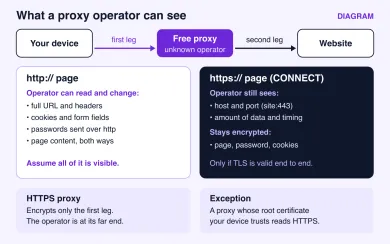
What a proxy can read depends on how the page itself is loaded.
For a plain http:// page, your browser sends the whole request to the proxy: the URL, the headers, cookies, and anything you type into a form. The proxy forwards it and passes the answer back. It can read every byte in both directions, and it can change them too. Injected ads, swapped download links and stripped security headers all live here. The Chromium documentation on proxy behaviour puts it plainly: with an ordinary HTTP proxy, proxied http:// requests are sent in the clear.
For an https:// page, the browser asks the proxy to open a tunnel with the CONNECT method (RFC 9110, section 9.3.6). After that, the proxy is supposed to forward bytes blindly. TLS runs end to end between your browser and the site, and the browser checks the site's certificate. As long as that holds, the proxy cannot read the page, your password or your cookies. It still sees the host name and port you asked for, because they are in the CONNECT line, and it sees how much data moved and when. Chromium's docs note that the target host name is sent to the proxy in the clear when the tunnel is set up. That is metadata, but metadata can be plenty: a list of the sites you visited and when is a profile.
The exception matters. A proxy that inspects TLS decrypts traffic and re-encrypts it with its own certificate. Browsers only accept that if the proxy's root certificate has been installed as trusted on your device. Corporate filters do this on managed laptops. A random free proxy cannot do it silently on a device that does not trust its certificate, so you would get a certificate warning instead. Clicking through that warning, or installing a "required" certificate from a free proxy site, hands the operator your HTTPS traffic. Never do either.
Two more points get mixed up a lot.
An "HTTPS proxy" is a proxy you connect to over TLS. It encrypts the first leg, from you to the proxy, so people on your Wi-Fi cannot read the CONNECT line or your proxy password. It does nothing about the proxy operator, who sits at the other end of that encrypted leg. Whether the leg from the proxy to the site is protected depends on the site using HTTPS.
The IP type is a separate question from the protocol. Whether an exit address is a datacenter, residential or mobile IP says nothing about how your traffic reaches the proxy, and nothing about who runs it.
| Choice | What it decides | Encrypts you to proxy? | Protects page content from the operator? | Says anything about trust? |
|---|---|---|---|---|
| HTTP proxy | How your app talks to the proxy | No | Only for https:// pages through an ordinary CONNECT tunnel | No |
| HTTPS proxy | How your app talks to the proxy | Yes, first leg only | Same as above; the operator still sits at the end of the leg | No |
| SOCKS5 proxy | How your app talks to the proxy, for any TCP traffic | No | Only if the app itself uses TLS to the site | No |
| Datacenter, residential or mobile IP | What address the site sees | Not a protocol property | No | No; it is about how sites classify the exit |
| Known provider account | Who runs the server and under what terms | Depends on the protocol you pick | Same technical limits | Yes: a named operator, terms and support |
Only the last row answers the trust question, and it is a contract, not a technical feature.
03Risks to your logins and accounts
Most damage from free proxies is quiet. Credentials and sessions leak, and you notice later.
Plain-HTTP logins are the obvious case. If a site, a router admin page or an old internal tool still accepts a password over http://, the proxy operator receives it as text. Many small APIs and scripts still talk plain HTTP on purpose, and their tokens go the same way.
Proxy passwords are the less obvious case. Paid proxies usually need a login, and many apps send it with HTTP Basic authentication. RFC 7617 is blunt about Basic: the user ID and password cross the network as cleartext unless something like TLS protects them. SOCKS5 has the same issue. Its username and password method, RFC 1929, sends the password in cleartext and says it is not recommended where sniffing is possible. That matters for paid proxies on untrusted Wi-Fi, and it is one reason some providers offer an HTTPS proxy endpoint.
Then there are account side effects. Public proxies are shared by everyone who found the same list. If a site has seen that exit IP sending spam, brute-force logins or scraping, your login from it starts with a bad reputation. Expect captchas, forced password resets, "unusual activity" locks, and in the worst case an account tied to an address the platform has already flagged. A residential or mobile exit from a provider does not guarantee acceptance either, but at least you are not sharing it with every bot that read the same public page.
Finally, DNS. Where your app resolves host names is a separate setting from where it sends traffic. Chromium sends name resolution to the proxy for HTTP and SOCKS5 proxies. Other apps differ. With curl, --socks5 resolves the name locally and --socks5-hostname lets the proxy do it, according to the curl manual. Chromium's docs also mention that Firefox exposes this choice as a setting called network.proxy.socks_remote_dns. If names are resolved locally, your own resolver still sees every site you visit, even though the site sees the proxy's IP.
04Speed, uptime and the limits of a free endpoint
Even if you only fetch public pages, free proxies are frustrating to depend on, and the reasons are structural.
A public list is a snapshot. Open proxies get found, overloaded, blocked, and closed, so an entry that worked this morning may time out tonight. Nobody is paid to keep it up. Bandwidth is shared with everyone else who found it, so latency jumps around. If an entry only speaks plain HTTP, you get no SOCKS5 for non-web apps and no encrypted first leg. Few offer a choice of country beyond what happens to be on the list, and none offer sticky sessions or rotation you can control.
Worse, a free proxy can be "alive" and still useless. It answers on its port, but the sites you need already block its address or show it a captcha wall. That is the difference between a proxy that responds and one that gets you where you are going.
Paid proxies are not automatically fast or accepted either. Their exits get blocked too, and residential speeds vary by exit. The difference is that with a provider you can ask for a refund, switch pools, pick a country, or open a ticket. With a list, your only move is to try the next line.
05Public list or provider trial: how to choose
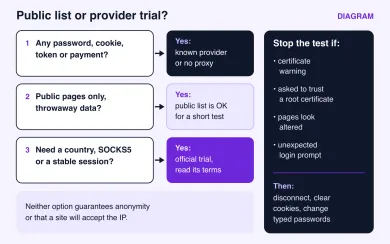
Here is how the two options compare on the things that actually decide the choice.
| Question | Public free list | Official provider trial |
|---|---|---|
| Who runs the server | Unknown | A named company with terms and a privacy policy |
| What it may log or change | Unknown; assume everything on plain HTTP | Defined by its terms; still a third party |
| Protocols | Whatever the entry speaks, found out by testing | Listed by the provider, often HTTP and SOCKS5 |
| IP type and country | Whatever happens to be listed | Selectable pool and country |
| Shared with | Everyone who found the list | Other customers of that pool |
| Uptime and support | None | Support and status from the provider |
| Fit for logins | No | Possible, within the provider's rules |
| Cost | Free in money | Free or cheap for the trial, paid after |
Trial terms differ a lot between providers: some give a small amount of traffic, some a time window, some need a card, and some only give a paid starter plan with a refund window. Read the provider's own page before you sign up, and do not assume a trial exists because one existed last year.
Stop a test immediately if any of these happen:
- the browser shows a certificate warning on a site that normally works;
- a page or an installer asks you to trust a new root certificate;
- familiar pages look different, with extra ads, pop-ups or changed download links;
- you get a login prompt you did not expect, on a site that does not normally ask.
None of these proves the operator is tampering with your traffic: a broken site certificate, a hotel or office network, security software on your device or a wrong system clock can cause the same signs. You cannot tell which from inside the test, so treat each one as a reason to stop and investigate. Disconnect, clear cookies for the sites you visited, and change any password you typed during the test.
06How to test a proxy without risking your accounts
The safest test checks the proxy before anything personal goes through it, and then checks your own route separately. Those are two different measurements.
Start with the endpoint. Our proxy checker takes a list, one proxy per line, in formats such as ip:port, user:pass@ip:port or with a socks5:// style prefix. You choose which sites each proxy has to reach, such as YouTube, ChatGPT or WhatsApp. The check runs from our server: it connects through each proxy to a test endpoint and to the sites you picked, then reports whether the proxy answered, its latency, country, anonymity level with any leaking header, and which of the chosen sites it reached.
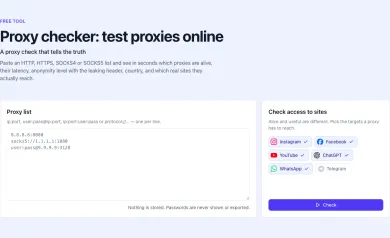
Read that result for what it is. A server-side probe tells you the proxy is reachable from our network and how its exit looks to the test endpoint and target sites at that moment. It does not tell you how your browser, phone or script is routed, whether your app resolves DNS locally, or whether the proxy will treat your traffic the same way tomorrow. A "dead" result can also mean the proxy only accepts connections from allowlisted IPs, which is common with paid accounts.
Then check your own route in the app that will use the proxy:
- Open My IP in the same browser profile or app. The address and country should be the proxy's. If you see your own address, the app is going direct.
- Load a few public
https://pages you know well and watch for certificate warnings or pages that look different. - If your tool lets you choose, make the proxy resolve DNS, for example
socks5h://incurl, and confirm the result again. - Only after all of that, and only with a known provider, try a low-value account. Never your main email, bank or work login.
If something fails, the cause is usually ordinary: a wrong port, a missing login that returns 407 Proxy Authentication Required, an app that ignores system proxy settings, or an exit the target site already blocks. None of these mean the proxy is malicious. A certificate warning or altered pages are different: they do not prove interference either, because the site, your network or your own device can cause them, but they are reasons to disconnect and find out why before anything else goes through that proxy.
07When a paid proxy is worth it
If the job involves logins, a specific country, a stable session, or more than a few dozen requests, a free list stops being a saving. You spend the difference on dead entries, captchas and risk you cannot measure. That is the point where a trial or a small plan from a named provider makes sense.
For accounts and geo checks, start with residential proxies or mobile proxies. For public pages at volume, datacenter proxies are cheaper and faster, and I would try them first. If you want residential or mobile exits with both HTTP and SOCKS5 access, these providers in our catalog are a reasonable shortlist to compare:

SOAX sells rotating residential and mobile proxies on a shared credit pool, with datacenter and ISP in the same plans. Builder starts at $200/mo + VAT (200 credits); Tier 1 traffic is $3/GB on Builder.

Bright Data is a large proxy network for data collection: residential, mobile, ISP and datacenter IPs in about 195 countries. Residential traffic can be paid as you go with no subscription, and datacenter and ISP addresses come in packs from 10 IPs. Residential and mobile access requires identity verification.

Before you pay, compare billing and trial terms on each card. Per-GB pricing suits light browsing and account work; per-IP or per-port plans often suit heavy scraping. Whichever you pick, run the same two checks again: the endpoint in the checker, then your own route on My IP.
Are free proxies safe to use?
Can a free proxy steal my passwords?
Is an HTTPS proxy safer than an HTTP proxy?
What is the difference between free and paid proxies?
Do free proxies hide my IP address?
How do I test a proxy safely?
Related articles
Proxy bandwidth and pricing: estimate cost per successful request
What proxy bandwidth means on a bill, what uses up traffic, how retries change the real cost per successful request, and how to find the break-even between plans.
Proxy vs VPN: which one fits your task
Proxy vs VPN compared by app coverage, encryption, DNS handling and IP type, with a task matrix and a quick way to check which IP sites actually see.
What is a proxy server and how does it work?
What a proxy server is, how it forwards requests, forward vs reverse proxies, protocol vs IP type, and how to check which IP a site sees.