
Proxy bandwidth and pricing: estimate cost per successful request
What proxy bandwidth means on a bill, what uses up traffic, how retries change the real cost per successful request, and how to find the break-even between plans.
Proxy bandwidth and pricing: estimate cost per successful request
This guide is for anyone reading a proxy plan and trying to work out what a month will really cost. We explain what "bandwidth" means on the bill, what eats traffic, and why retries matter more than the headline rate. All prices below are hypothetical, chosen to make the arithmetic easy to follow. Top Proxy does not sell IPs. For current offers, compare providers in the catalog.
01What proxy bandwidth means on a bill
In everyday networking, bandwidth means speed: how many bits per second a link can carry. A home connection of 100 Mbps has a bandwidth of 100 megabits per second. Proxy pricing pages use the same word for something else. On a residential or mobile plan, "10 GB of bandwidth" means 10 gigabytes of traffic that you can push through the provider's network before you pay more. It is a volume, not a speed.
The two ideas meet in "unlimited bandwidth" offers, and that is where people get confused. A port with a 100 Mbps speed cap can move at most 12.5 megabytes per second. If it ran flat out for one hour, that would be 45 GB. So an unlimited plan still has a ceiling. It is set by the port speed, the thread limit, and the fair use clause, not by a GB counter.
Before comparing plans, check which meaning each line uses:
| Term on the page | What it measures | Typical unit |
|---|---|---|
| Traffic, data, bandwidth (on GB plans) | Volume of bytes that passed through the proxy | GB per month or per top-up |
| Port speed, throughput | How fast one connection or port can move data | Mbps or Gbps |
| Concurrent threads, sessions | How many connections you may open at once | Count |
| Fair use | Behavior the provider tolerates on "unlimited" plans | Policy text, sometimes a hidden GB cap |
02Per GB, per IP, per port or per period: what each plan charges for
Proxy plans bill one of four things. Most confusion comes from comparing a price of one kind against a price of another.
Per GB is the usual model for rotating residential and mobile pools. You pay for every byte that crosses the provider's network, and the IP can change on every request. Cost grows with your workload, so a heavy page or a retry storm shows up on the invoice.
Per IP is common for datacenter and ISP (static residential) proxies. You rent a fixed set of addresses for a month. Traffic is often unmetered or capped high, so cost depends on how many IPs you hold, not on how much you download.
Per port sells you an entry point, sometimes with a rotating pool behind it and a speed limit attached. Per period plans, such as a day or a month of "unlimited" access, are a variation on the same idea.
| Billing unit | Cost grows with | Works well when | Watch for |
|---|---|---|---|
| Per GB | Bytes transferred, including failures | Light pages, uneven monthly volume | Retries, heavy assets, traffic that expires |
| Per IP | Number of addresses | Many requests per IP, logged-in sessions | IP bans you still pay for |
| Per port | Number of entry points | Steady high volume | Speed caps, thread limits |
| Per period ("unlimited") | Time | Predictable heavy load | Fair use, throttling after a soft cap |
Rotating pools sit in the residential proxy catalog and the mobile proxy catalog. Per IP pricing is the norm in the datacenter proxy catalog.
03What uses up proxy traffic
The provider counts bytes, not pages, and it counts them at the proxy. That has a few consequences that are easy to miss.
- Response bodies. HTML, JSON, images, scripts, fonts, video segments. A headless browser that loads every asset can transfer ten or twenty times more than a client that fetches only the HTML.
- Request bytes. Headers, cookies, and POST bodies travel too. Many providers meter both directions, so check the terms.
- Encryption overhead. Through an HTTPS tunnel the proxy sees encrypted bytes, including TLS handshakes. New connections cost more than reused keep-alive connections.
- Redirects and error pages. A 302 to a login page, a CAPTCHA, a 403 block page. Each is a real response, and each is billed.
- Retries. A failed request costs bytes, and then you send it again.
Compression helps. If your client sends Accept-Encoding: gzip and the site honors it, the compressed body is what crosses the proxy. Blocking images, fonts and media in a headless browser usually saves more than any discount code.
The best number you can have is a measured one. Send 100 to 200 typical requests through the proxy, then compare your own log of response sizes with the usage figure in the provider dashboard. That gives you an average billed size per attempt, which is the input for everything below.
04Retries and the real cost per successful request
Here is the uncomfortable part. Price per GB tells you the cost of traffic. What you actually want to know is the cost of a result: one product page parsed, one search result saved, one account checked. Those are different numbers, and the gap between them is your success rate.
If 80% of attempts succeed, you need 1.25 attempts for every useful page. Failed attempts are often smaller than good ones, because a block page is lighter than a product page, but they are never free. The formula is short:
Billed GB = (successful results × size of a success + failed attempts × size of a failure) × (1 + overhead share)
Cost per successful result = billed GB × price per GB ÷ successful results
The table below runs that formula for one hypothetical job at three success rates. The assumptions are 10,000 successful pages a month, 0.5 MB per success, 0.2 MB per failure, 10% overhead for handshakes and redirects, and a hypothetical rate of $4.00 per GB.
| Success rate | Attempts | Failed attempts | Billed traffic | Monthly cost | Per 1,000 successes |
|---|---|---|---|---|---|
| 95% | 10,526 | 526 | 5.62 GB | $22.46 | $2.25 |
| 80% | 12,500 | 2,500 | 6.05 GB | $24.20 | $2.42 |
| 50% | 20,000 | 10,000 | 7.70 GB | $30.80 | $3.08 |
Notice what moves the bill. Dropping from 95% to 50% success raises the cost per result by about 37% at the same price per GB. That is why a pool with a cleaner reputation at a higher hypothetical rate can be cheaper per result than a bargain pool that gets blocked half the time. I would always compare plans on cost per 1,000 successes, never on the sticker rate alone.
05A worked budget example
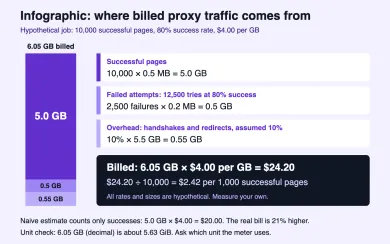
Let's put the 80% row on paper step by step, using the same hypothetical assumptions.
- Goal: 10,000 successful product pages per month.
- Attempts: 10,000 ÷ 0.80 = 12,500. Failed attempts: 2,500.
- Traffic from successes: 10,000 × 0.5 MB = 5,000 MB = 5.0 GB.
- Traffic from failures: 2,500 × 0.2 MB = 500 MB = 0.5 GB.
- Overhead: 10% of 5.5 GB = 0.55 GB. Billed total: 6.05 GB.
- Cost at a hypothetical $4.00 per GB: 6.05 × 4.00 = $24.20.
- Cost per successful page: $24.20 ÷ 10,000 = $0.00242, or $2.42 per 1,000.
The naive estimate, 10,000 pages × 0.5 MB × $4.00, gives $20.00. The real figure is 21% higher, and nothing about the provider changed.
Three more adjustments belong in the budget.
GB versus GiB. Some dashboards count a GB as 1,000,000,000 bytes. Others count 1,073,741,824 bytes (a gibibyte) and still print "GB". The same 6.05 decimal GB equals about 5.63 GiB. The gap is roughly 7%, which matters when you sit near a plan limit. The provider's documentation or support will tell you which unit the meter uses.
Minimums and expiry. Suppose the plan has a hypothetical minimum purchase of 10 GB at $4.00, which is $40.00. You use 6.05 GB, so the effective price is $40.00 ÷ 6.05 = about $6.61 per GB used. Check whether unused traffic rolls over or expires at the end of the billing period.
Tax. Depending on your country and the provider's, VAT or sales tax may be added at checkout. With a hypothetical 20% rate, that $40.00 top-up becomes $48.00. Quotes on pricing pages are often shown before tax.
Finally, add a safety margin for bad weeks. With 25% headroom, the 6.05 GB estimate becomes about 7.56 GB.
06Choosing a plan: break-even points and "unlimited" fair use
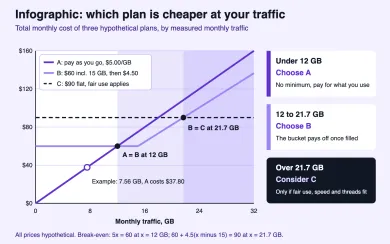
Once you know your monthly traffic, the plan choice becomes a break-even exercise. Take three hypothetical plans.
- Plan A: pay as you go, $5.00 per GB, no minimum.
- Plan B: $60 per month with 15 GB included, then $4.50 per GB.
- Plan C: $90 per month for an "unlimited" port, subject to fair use.
Plan A costs $5.00 × traffic. It matches Plan B's $60 at 60 ÷ 5 = 12 GB. Above 12 GB, Plan B wins, and it keeps winning past 15 GB because its overage rate is lower. Plan B reaches Plan C's $90 when 60 + 4.50 × (traffic − 15) = 90, which is at about 21.7 GB.
| Monthly traffic | Plan A | Plan B | Plan C | Cheapest |
|---|---|---|---|---|
| 7.56 GB (example with margin) | $37.80 | $60.00 | $90.00 | A |
| 12 GB | $60.00 | $60.00 | $90.00 | A or B |
| 20 GB | $100.00 | $82.50 | $90.00 | B |
| 30 GB | $150.00 | $127.50 | $90.00 | C, if fair use allows |
Our worked example, 7.56 GB with margin, lands clearly on Plan A. Paying $60 for a bucket you fill halfway is a common way to overspend.
Plan C deserves suspicion before it deserves your money. "Unlimited" plans almost always come with a fair use clause, and the useful questions are concrete. Is there a soft cap in GB after which speed drops? How many concurrent threads are allowed? What is the port speed? Are some targets or traffic types excluded? A 10 Mbps port moves at most 1.25 MB per second. If your job needs 30 GB in a few hours, that port cannot deliver it, however unlimited the label says it is.
Per IP plans follow the same logic with a different input. With a hypothetical $2.50 per IP per month, 20 static IPs cost $50.00 whether you send 2 GB or 40 GB through them. They pay off when you send many requests through each address and the target does not block them.
07How to compare offers in the catalog
Turn the arithmetic into a short routine before you buy.
- Pick the proxy type your target needs. Logged-in or strict sites often need residential or mobile exits. Simple public pages may work from datacenter IPs.
- Open the matching catalog page and filter by billing model. Compare per GB plans with per GB plans, and per IP plans with per IP plans.
- For each candidate, write down the rate, the minimum purchase, expiry, the GB unit, tax, and the fair use terms.
- Run a small paid or trial test. Measure your success rate and average billed size per attempt.
- Compute cost per 1,000 successes for each provider and pick on that number.
Before the test, confirm the proxy actually works and exits where you expect. The proxy checker tests an endpoint from our server, and my IP shows the address and location a site sees from your own browser or app. If you are new to the basics, what a proxy server is covers the request path.
Providers in the catalog with per GB residential plans include:

SOAX sells rotating residential and mobile proxies on a shared credit pool, with datacenter and ISP in the same plans. Builder starts at $200/mo + VAT (200 credits); Tier 1 traffic is $3/GB on Builder.

Bright Data is a large proxy network for data collection: residential, mobile, ISP and datacenter IPs in about 195 countries. Residential traffic can be paid as you go with no subscription, and datacenter and ISP addresses come in packs from 10 IPs. Residential and mobile access requires identity verification.
Treat any provider, including these, as a candidate for your own test, not a verdict. Your target site decides the success rate, and the success rate decides the bill.
08Frequently asked questions
What does bandwidth mean for a proxy?
Do failed requests count toward proxy bandwidth?
How much traffic does one web page use through a proxy?
Is a GB in a proxy dashboard the same as a GiB?
Is unlimited bandwidth proxy really unlimited?
How do I reduce proxy bandwidth costs?
Related articles
Are free proxies safe? Risks, limits and how to test one
What a free public proxy can see, why logins and speed suffer, how a public list compares with a provider trial, and how to test a proxy safely.
Proxy vs VPN: which one fits your task
Proxy vs VPN compared by app coverage, encryption, DNS handling and IP type, with a task matrix and a quick way to check which IP sites actually see.
What is a proxy server and how does it work?
What a proxy server is, how it forwards requests, forward vs reverse proxies, protocol vs IP type, and how to check which IP a site sees.