407 Proxy Authentication Required: what it means and how to fix it
Getting HTTP 407 from a proxy? Learn what Proxy Authentication Required means, then check credentials, the IP allowlist, and special characters in the password.
You set up a proxy, sent a request, and got 407 Proxy Authentication Required back instead of a page. This guide is for anyone using a paid proxy in a browser, a scraper, or a script who needs to find out why the proxy keeps rejecting them. We walk through the causes in the order they usually show up. Top Proxy compares proxy services; we don't sell IPs or hand out free credentials, so every example below uses placeholder values.
01What 407 Proxy Authentication Required means
HTTP 407 is a proxy authentication challenge. MDN describes it as a request that failed because it "lacks valid authentication credentials for the proxy server" (MDN, 407). The status is defined in RFC 9110, section 15.5.8.
The exchange works like this. The proxy replies with 407 and a Proxy-Authenticate header naming the scheme it expects, for example:
HTTP/1.1 407 Proxy Authentication Required
Proxy-Authenticate: Basic realm="proxy"
The client is then supposed to repeat the request with a Proxy-Authorization header carrying the credentials. That means a single 407 is not automatically a failure: some clients send the first request without credentials, receive the challenge, and then retry with them. The problem is a 407 that keeps coming back after the client has answered the challenge, or a client that never answers it.
It helps to separate 407 from its look-alike, 401:
| Status | Usually raised by | Challenge header | Credentials header |
|---|---|---|---|
| 401 Unauthorized | The destination site or API | WWW-Authenticate | Authorization |
| 407 Proxy Authentication Required | A proxy on the path | Proxy-Authenticate | Proxy-Authorization |
A 401 normally means the destination wants its own login. It is a hint, not proof, that your proxy login worked. Likewise, a 407 tells you which kind of authentication was challenged, but the status code alone doesn't prove how far the request travelled. Any intermediary on the path can return 407, including a corporate proxy in front of the one you configured. If the response doesn't look like your provider's, check whether your network routes traffic through another proxy first.
Some clients don't show the number at all. A browser may pop up a login dialog for the proxy, and a library may raise an error mentioning a failed tunnel and 407. The cause is the same.
02Common causes at a glance
Most persistent 407s come down to a short list of problems. Use this table to pick where to start, then read the matching section.
| Symptom | Likely cause | What to check |
|---|---|---|
| 407 persists even after the client sends credentials | Wrong username or password | Copy the credentials again from the provider dashboard |
407 and the client never sends Proxy-Authorization | Credentials not configured, or an unsupported auth scheme | Check the client's proxy settings and supported methods |
| Worked yesterday, rejected today, config unchanged | Your external IP changed and you use IP allowlisting | Compare your current public IP with the allowlist |
| Fails only with one password, or only in one tool | Special characters in the password are mangled | Percent-encode inside a proxy URL; pass the literal value in separate fields |
| Browser works, script fails (or the reverse) | Different settings, source IP, or path per client | Check each app's proxy settings and network path separately |
| Rejected after changing country, session, or plan options in the username | Malformed username parameters | Rebuild the username from the provider's documented format |
| Rejected after the plan expired or traffic ran out | Account-side block | Check plan status in the provider dashboard |
Providers handle expired plans differently: some return 407, others another error or a closed connection, so treat the last row as something to rule out.
03Check the username and password first
The most common cause is the simplest: the proxy didn't get the credentials it expected. Work through these in order.
- Copy the credentials fresh. Take the proxy username and password from the provider's dashboard, not from an old note. Many providers issue separate proxy credentials that differ from your dashboard login.
- Watch for stray whitespace. A trailing space or newline copied with the password is invisible but makes the credentials wrong.
- Rebuild the username if it carries options. Many residential and mobile providers encode targeting into the username, such as a country code or a session token. The syntax is provider-specific; one wrong separator or an unsupported value can lead to a rejected login. Use the format from your provider's documentation rather than one copied from another service.
- Confirm the host and port match the credentials. Some providers use different gateways or ports for different products, and credentials for one may not work on another.
- Confirm how the client authenticates. Some apps have no username or password field. They may still authenticate through system settings or a negotiated method such as the one used by corporate networks, or they may support credentials only for some proxy types. Check the client's documentation for which proxy authentication methods it supports before assuming it can or cannot answer the challenge.
To see what's happening on the wire, curl is a quick test. Using placeholder values:
curl -q -v --noproxy '' --connect-timeout 10 --max-time 30 \
  --proxy http://proxy.example.net:8000 \
  --proxy-user 'USERNAME:PASSWORD' \
  https://example.com/
-q must come first; it makes curl ignore any .curlrc defaults that could change the test. --noproxy '' overrides a NO_PROXY setting that might otherwise send the request around the proxy, and the two timeouts keep the test bounded. The -v flag prints request and response headers, so you can see the 407 together with the proxy's Proxy-Authenticate header and, for many methods, whether curl answered it. curl uses Basic as its default proxy authentication method, and --proxy-anyauth tells it to pick a suitable method if the proxy asks for something else (curl manual).
Two cautions. Verbose output can contain encoded credentials, cookies, and tokens, so mask Proxy-Authorization, Cookie, and any token values before sharing a log. And a password typed on the command line can end up in shell history and is briefly visible in the process list, as the curl manual warns; expanding an environment variable into the argument doesn't change that. For anything beyond a throwaway test, use your tool's protected credential input, such as a config file only you can read.
This test keeps normal TLS verification. You don't need -k or any "insecure" switch to debug a 407; disabling verification doesn't fix proxy authentication and only hides real problems.
04IP allowlisting and an external IP that changed
Many providers offer another way to authenticate: you register your public IP address, and the proxy accepts connections from it without a password. Some providers also let you combine this with username and password, or apply different methods per endpoint. Allowlisting has a failure mode that produces exactly the "it worked yesterday" kind of rejection. Depending on the provider, that rejection may be a 407, a 403, a dropped connection, or another error.
The proxy sees the IP your connection comes from, not the address your computer shows on its own network card. That source IP depends on your path to the proxy:
- Home and mobile connections often get a new public IP after a router restart, a reconnect, or simply over time.
- NAT and carrier-grade NAT mean the provider sees the shared public address, not your local
192.168.x.xor10.x.x.xaddress. - A VPN, a corporate network, or another proxy in front of the provider changes the source IP to that network's exit.
- IPv4 vs IPv6. If you allowlisted an IPv4 address but your connection reaches the provider over IPv6, or the reverse, the proxy may not recognize you. Whether this applies depends on whether the provider's gateway accepts IPv6.
To check, open What is my IP with the proxy turned off in that browser and compare the address it shows with your provider's allowlist. The page shows the IP of that one request from that one browser. If your script runs on a server, inside a container, or through a VPN, its source IP can differ, so check from the same machine and network path the failing client uses.
If you switched from allowlisting to a password, or the other way round, also check that the endpoint you're using expects the method you're now sending.
05Special characters in the password
Passwords with symbols such as @, :, /, #, %, or ? are a frequent source of 407 that looks random: the same credentials work in one tool and fail in another. These characters have meaning inside a URL, and many tools take the proxy as a single URL like http://user:password@host:port.
Take the placeholder password p@ss:w/rd%#1. Inside a proxy URL, the @ can be read as the end of the credentials, and /, #, or % can cut off or corrupt the rest. How a literal : in the password is treated varies between URL parsers. Because parser behavior differs, the safe rule is to percent-encode every reserved character in the username and password before putting them in a URL.
The fix depends on how the tool takes the credentials:
How the tool takes credentials → What to do
- 01A single proxy URL with
user:password@insidePercent-encode the username and password before putting them in the URL - 02Separate username and password fields, or a separate option like curl's
--proxy-userEnter the literal password, without percent-encoding - 03An environment variable such as
HTTPS_PROXYIt's a URL, so percent-encode, then check how your specific tool parses it
Don't percent-encode blindly everywhere. If you encode a password and then type it into a separate password field, the proxy receives %40 instead of @ and rejects it.
curl. The manual says user and password in the proxy string are URL-decoded, so you can pass @ as %40 and a colon as %3a (curl manual). With the placeholder password above:
curl -q --noproxy '' --connect-timeout 10 --max-time 30 \
  --proxy 'http://USERNAME:p%40ss%3Aw%2Frd%25%231@proxy.example.net:8000' \
  https://example.com/
Alternatively, keep the proxy URL clean and pass the credentials separately with --proxy-user, quoting the value in single quotes so your shell doesn't interpret characters like $, !, or #. The same command-line exposure caution from above applies to both forms.
Python. Encode each part with the standard library, then build the URL:
from urllib.parse import quote
import requests

username = "USERNAME"
password = "p@ss:w/rd%#1"  # placeholder; load the real one from a secret store

proxy = (
    f"http://{quote(username, safe='')}:{quote(password, safe='')}"
    "@proxy.example.net:8000"
)

try:
    response = requests.get(
        "https://example.com/",
        proxies={"http": proxy, "https": proxy},
        timeout=(10, 30),  # connect timeout, read timeout
    )
    print(response.status_code)
except requests.exceptions.ProxyError:
    # Could be a 407 on the tunnel, a refused port, or another proxy failure
    print("Proxy connection failed; check the proxy address, auth, and allowlist.")
quote(..., safe='') turns the placeholder password into p%40ss%3Aw%2Frd%25%231, and requests decodes the username and password from the proxy URL before building the header. For an HTTPS destination, the proxy challenge happens while opening the tunnel, so a 407 there typically surfaces as a ProxyError before any response object exists. ProxyError is not specific to authentication, though: a closed or wrong proxy port raises it too, so the message stays generic. The example prints that short message instead of the raw exception, which can include the proxy URL with credentials. The timeout values limit connecting and waiting between reads; they are not a cap on the total duration of the request. Certificate verification stays on (the default), and there is no retry loop: retrying with the same credentials won't fix a 407.
What we saw in a controlled test
To check these behaviors, we ran Python Requests 2.34.2 on Python 3.14.4 against a local test proxy on the same machine, using dummy credentials (demo with a password containing @, :, /, #, %) and TLS verification on. This shows how the client and protocol behave, not how any commercial provider performs.
Case → Observed result
- 01HTTP destination, no proxy credentialsResponse with status 407
- 02HTTPS destination, no proxy credentials
ProxyErrormentioning 407, no response object - 03HTTP and HTTPS, percent-encoded credentials in the proxy URLStatus 200
- 04
HTTPProxyAuthhelper, HTTP destinationStatus 200 - 05
HTTPProxyAuthhelper, HTTPS destinationProxyErrormentioning 407 - 06SOCKS5 with percent-encoded credentials in a
socks5h://URLStatus 200 - 07Proxy port closed
ProxyErrorwith no 407 - 08Proxy auth accepted, destination returns 401Status 401
In this test, the HTTPProxyAuth helper authenticated plain-HTTP requests but not the HTTPS tunnel, so for HTTPS put encoded credentials in the proxy URL.
06Verify the fix
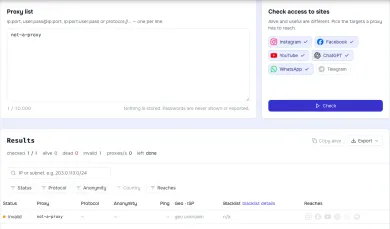
Start with the proxy checker. Enter the proxy details and it connects from our server and reports whether the endpoint answers. Read the result with two caveats. First, the checker connects from its own IP, not yours. If your provider uses IP allowlisting and the checker's IP isn't allowed, the check may be rejected with a 407, a 403, a dropped connection, or another error, and that alone doesn't mean your setup is broken. Second, a successful check shows that the endpoint accepted those credentials from the checker's location. It doesn't prove your browser or script routes through the proxy.
For the second part, run the curl test from the machine with the problem, then visit What is my IP through the configured proxy. Compare the IP you see with the exit IP, range, or endpoint your provider says you should get. A different IP alone isn't proof of the right route (a VPN would also change it), and an unchanged IP alone doesn't prove the proxy was bypassed; check it against the expected exit and the route the client takes. Country or location alone isn't enough either, since a proxy can exit in your own country.
If the checker passes but your client still gets 407, look at what differs between the two paths: the source IP and IP version, the endpoint and port, the authentication method, how the client handles special characters, or another proxy on your network answering first.
07When it's time to look at another provider
If you've ruled out the causes above and keep losing time to undocumented username syntax or confusing credential setups, it may be worth comparing services that document their auth options clearly. You can browse mobile proxy services or start with these catalog entries. Listing here doesn't mean we've tested any of them against your specific client.

Bright Data is a large proxy network for data collection: residential, mobile, ISP and datacenter IPs in about 195 countries. Residential traffic can be paid as you go with no subscription, and datacenter and ISP addresses come in packs from 10 IPs. Residential and mobile access requires identity verification.

Oxylabs sells residential, datacenter and mobile proxies. Residential self-serve starts at $6/GB for 5 GB/month. Buyer payments: cards, wire, AliPay, PayPal.

SOAX sells rotating residential and mobile proxies on a shared credit pool, with datacenter and ISP in the same plans. Builder starts at $200/mo + VAT (200 credits); Tier 1 traffic is $3/GB on Builder.

Decodo (formerly Smartproxy) sells residential and datacenter proxies. Residential: $4/GB without a monthly plan, or monthly packs from $3.75/GB for 3 GB. Payments: cards, PayPal, Alipay, Google/Apple Pay, crypto (with limits).
08FAQ
What does 407 Proxy Authentication Required mean?
What is the difference between 401 and 407?
Why did my proxy start rejecting me when nothing changed?
Do I need to URL-encode my proxy password?
The proxy checker says my proxy works, but my app still gets 407. Why?
Should I disable SSL verification to get past a 407?
Related articles
Playwright proxy: browser and context configuration
How to set a proxy in Playwright at browser or context level, pass credentials, use SOCKS5, bypass hosts, confirm the exit IP and fix common proxy errors.
Python requests proxy: authentication, timeouts and errors
How to route Python requests through an HTTP or SOCKS5 proxy: the proxies dict, username/password auth, environment variables, timeouts, and what ProxyError, 407 and SSLError actually mean.
What are residential proxies and how do they work
Residential proxies exit through consumer ISP addresses. This explains pools, sticky sessions, what sites see, and what to ask a provider before you buy.
4 min