How mobile proxies work: IP rotation and sessions
Why a site still remembers you after an IP change: what a mobile exit is made of, why carriers use CGN, the three kinds of "session", what rotation really changes, and what to check before renting.
How mobile proxies work: IP rotation and sessions
You click the change-IP link, the IP lookup page shows a different region, and the online store still greets you by name and keeps your cart. Nothing broke: the network exit changed, not the browser session. Below we break down which layers are involved, what rotation actually does, and how to test a mobile exit on your own client. If you are choosing between modes rather than learning how they work, see sticky vs rotating proxies.
01The address changed, but the site still remembers you
A typical picture. You've connected your browser through mobile proxies, opened a "what's my IP" page, and written the address down.
You clicked the change-IP link, refreshed the page, and the address is now different, sometimes even with a different city in the geodatabase. You go to an online store's account page, and you're still logged in, the cart is intact, the recommendations are the same.
To a beginner this looks like a contradiction: the address is new but the identity is old. In reality there's no contradiction, because the exit IP and the application session live on different layers and barely know about each other.
To stop getting confused, it helps to break down what a mobile exit is made of and what rotation actually changes.
02What a mobile exit is made of
A mobile proxy passes requests through an exit on a cellular network. In a typical setup, the client connects to a gateway, and from there traffic goes through a modem with a SIM card or another device with a mobile connection. The specific implementation varies between services. The client (browser, script, app) connects to the gateway over HTTP(S) or SOCKS5, the gateway forwards traffic to the modem, the modem hands it to the carrier, and the carrier sends packets out to the internet using its own address.
Hence the first distinction, which often gets lost.
The word "mobile" describes the exit network, that is, where the site sees your connection coming from. The words HTTP and SOCKS5 describe the protocol you use to talk to the gateway. These are independent things. The same mobile exit can be available over HTTP and SOCKS5; the address, port, and authentication method need to be taken from the settings of the specific connection. The connection protocol says nothing about the type of exit, and the type of exit doesn't determine the protocol. The distinction matters in practice, too. SOCKS5 works at the level of TCP connections and can proxy more than just the web, while an HTTP proxy understands the structure of requests, supports CONNECT for HTTPS, but in its pure form is oriented toward web traffic.
With the same exit, both options can use the same public address. But a site may also take other request signals into account: the same IP doesn't make connections completely indistinguishable.
03Why an IP can be shared
The address the site sees isn't necessarily assigned to your device alone.
To distribute public IPv4 addresses among subscribers, a carrier may use CGN (carrier-grade NAT), that is, carrier-level address translation. Then the subscriber's internal address and the public address visible to the site differ; one public address can serve several subscribers. A separate block, 100.64.0.0/10, is reserved for this internal layer in RFC 6598, and it is not routed on the internet, so sites never see it. Two caveats are needed here. First, each carrier builds its NAT scheme its own way, and pool sizes, subscriber-to-address binding, and translation lifetimes vary, so there's no single scheme for all mobile carriers. Second, a shared address doesn't imply either uniqueness or anonymity.
A single public IP can be used by many subscribers at one moment, and a minute later your modem can get an address that someone else just had. This is a natural property of cellular networks, not a feature of a particular proxy.
It also follows that geodatabases and ASN remain indirect signals. They show which carrier and roughly which region a range belongs to, but they don't prove that the modem is in a specific city and say nothing about the quality of the address. The reputation of a specific IP is checked separately, for example against DNSBL blacklists.
04Three different "sessions"
The word "session" in proxy discussions means at least three different things, and confusing them causes most misunderstandings.
1. The mobile channel session, or exit IP. This is the period of time during which the modem holds the same public address. It ends at your command (rotation), at the gateway's timer, or without your involvement when the carrier rebuilds the translation or the modem reconnects to the network; moving between base stations doesn't necessarily change the public IP by itself. The concept of a sticky session is tied to this layer: the gateway tries to keep the chosen exit for requests with the same session identifier within an agreed window. This is not the same as the mobile connection session or website authorization. It's important to understand whose promise this is. Sticky remains a condition of a specific service that simply doesn't initiate a change itself. The carrier makes no guarantees in this regard, and a forced address change on the network side remains possible at any moment. How long an address lasts without a command depends on the specific network and the specific day; there's no constant here.
2. The connection session, that is, TCP and HTTP. Per RFC 9293, a TCP connection is defined by a socket pair, an address and a port on each side. If an already open connection loses its former address or NAT mapping, it may break or hang until timeout. But a gateway can apply rotation only to new connections while keeping the old route for already open ones: this behavior needs to be tested separately.
Long-lived HTTP connections and WebSocket depend on the transport. At the same time, the client-to-gateway connection and the gateway-to-site connection are different segments: losing the mobile exit doesn't necessarily close the first one immediately. Restoring the transport and restoring authorization also require different checks.
3. The application session, cookies, and authorization. This layer is managed by the site and the browser. The server issues a cookie, the browser stores it and returns it with every request according to the rules for domain, path, expiry, and attributes, as described in MDN's guide to cookies. None of these rules mentions the client's IP address. Changing the external address by itself doesn't clear cookies, localStorage, or the cache. If a site wants to react to an address change, ask for re-login, show a warning, or restrict actions, that will be a decision of the server-side logic. Such a reaction isn't an automatic consequence of rotation.
Now the original situation is explained without magic: rotation affected layer 1, possibly broke something on layer 2, and layer 3 remained untouched because the cookie lives in the browser and is sent as before.
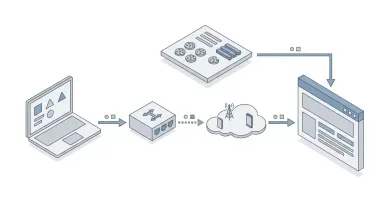
Conceptual diagram: the mobile network exit and the application session are separate layers.
05What happens during rotation
The change-IP command is usually implemented in one of two ways. Either on a timer, when the gateway initiates the change itself at a set interval, or via a link or API call, when you trigger it. Technically, the change comes down to the modem reconnecting to the carrier's network. The modem drops the data session and brings up a new one, the carrier assigns a new translation, and a different public address appears on the outside. Such a reconnection may temporarily interrupt access; its duration needs to be checked on the specific connection. In a pool-based architecture, the exit change may be performed differently, without reconnecting the same modem. Hence several consequences that those who use mobile proxies in their work should keep in mind.
A new address doesn't have to differ drastically from the old one, because the carrier's pool is finite, and after reconnecting the modem may get an address from the same subnet, and sometimes exactly the one it had. This isn't a proxy error, because the gateway did everything it could, and address distribution remains the carrier's domain.
For the same reason, it's pointless to judge the quality of rotation by whether the first octet changed. The command may not produce a result at all. The modem didn't register on the network, the carrier's response timed out, coverage briefly dropped, and all this ends with no new address, or one that appears with a delay. Proper client code checks the address after the command rather than assuming it changed. Old connections aren't carried over. With some gateways, a new rotation applies to new connections while already open ones are terminated separately; with others, everything breaks at once. There's no seamless address change at the TCP level, since a connection is by definition bound to addresses.
If rotation affected the route of an already open download or WebSocket, the client may need to reconnect. If the old exit is kept until the operation completes, it may finish without a break.
The timer interval remains your parameter, not a property of the network.
A separate note on DNS and IPv6. If the client resolves names locally and sends only TCP through the proxy, the site sees the mobile address, but DNS queries go out from your home address, and it's a similar story with IPv6, because some clients and systems prefer an IPv6 route that bypasses the proxy if one is available.
Neither leak depends on rotation and both are checked separately.
06Where a mobile network helps, and where stability matters more
There's plenty of value in a mobile exit in permitted scenarios, and it isn't about bypassing anything. Here's where mobile proxies make sense.
Checking your own site through a mobile subscriber's eyes. From such an exit it's convenient to check regional display, geotargeting, and CDN behavior on your own properties. That said, a mobile IP by itself doesn't turn a desktop browser into a phone: adaptive layout, User-Agent, and device behavior are tested separately.
Testing how resilient your client is to an address change. If you're developing an app with long-lived connections, rotation gives you a reproducible way to check how the client survives a break, whether it reconnects, whether it loses data, and whether it hangs until timeout. Here you specifically need controlled changes rather than stability.
Debugging authorization logic on your own side. It's useful to see what your site does when the IP changes within a session, whether that's nothing, a warning, or a re-login request. This is a test of your own server-side logic, not someone else's.
There are also the opposite cases, such as long exports, large uploads, WebRTC calls, and long stateful API sessions, where losing the former connection may require repeating the operation, and a mobile exit with its natural instability isn't the best choice there. If a task requires one address for hours, you need either a mode without a timer, with the understanding that the carrier can still step in, or a different type of exit altogether.
And the general rule is that mobile proxies don't make you invisible, don't create a new identity, and don't protect you from site checks. They change one thing, namely which address and which network the connection comes from, and everything else remains up to you and the rules of the platforms you use.
07What changes and what doesn't during rotation
| Layer | Changes during rotation? | Comment |
|---|---|---|
| Public exit IP | Yes, as a rule | May match the previous one or stay in the same subnet |
| ASN and region per geodatabase | Sometimes | Indirect signals that depend on the carrier's pool |
| Open TCP connections | May break | Depends on preserving the old route and on the rotation implementation |
| Long-lived HTTP connections and WebSocket | Depend on the transport | A break may require a new connection |
| Cookies, localStorage, browser cache | No | Stored by the client, not tied to IP |
| Site authorization | No, unless the site decides otherwise | The reaction is determined by server-side logic |
| Browser and device fingerprint | No | Headers, fonts, canvas, and so on aren't tied to the address |
| Local DNS queries and the IPv6 route | No | If they bypass the proxy, they remain yours |
The table explains why the store keeps greeting you by name. The network address and the browser state change independently; the application server can use both signals when checking a session.
08A checklist before renting
Before renting mobile proxies, it's better to test them on a real client and on your own site or a test bench you're allowed to connect to. Briefly, point by point.
- Exit network type. Make sure the address actually belongs to a mobile carrier, not to a data center with a mobile sign out front. A request to an IP lookup page and a look at the ASN give you a minimal check, but remember that this is an indirect signal.
- Rotation mode. By timer, by link, or via API, and whether the timer can be turned off entirely. Check that the command actually changes the address, and how many seconds it takes in your specific case.
- Address persistence within an operation. Run a long operation, such as a file download or a series of requests, and see whether the address lasts until the end without a command. Repeat several times, because a single result proves nothing.
- Termination of old connections. Open a long connection, change the IP, and record what happened, whether it broke immediately, hung until timeout, or continued from the old address. Any option is acceptable, but you need to know it in advance.
- Latency and drops. A proxy checker shows basic availability and anonymity type, but measure response time and the share of failed requests on your own traffic at the time of day you plan to work. Someone else's numbers won't help here.
- DNS and IPv6 in the real client. Check what DNS queries go through and whether the proxy bypasses the IPv6 route. Do this with the browser or library you'll actually use, not a separate utility.
- Limits, traffic, and protocols. Restrictions on traffic, the number of simultaneous connections, change frequency, HTTP and SOCKS5 support, and UDP if needed.
- Terms of use. What the service's terms and your jurisdiction's laws allow, and which actions will get your account blocked by the provider. Testing other people's resources without permission isn't on this list.
You can run this checklist on any service in the mobile proxy catalog. mobileproxy.space, for example, offers all three modes from this article: IP change by link or API, automatic rotation every N minutes, and no rotation at all, with ports over HTTP and SOCKS5:

Mobile proxies on real SIMs by country and carrier, residential bandwidth packages, plus server and backconnect lines. Pay by card, SBP, or crypto.
09What to check first
IP rotation changes the point of exit to the internet, and only that.
Connections may break if rotation affected their former route; for new connections and already open ones, the gateway's behavior may differ. Cookies, authorization, and the browser fingerprint live in the client and don't depend on the address, unless the site itself decides to react to it.
A shared public address remains a normal consequence of carrier NAT, and it promises neither uniqueness nor anonymity. If you keep these three layers separate, mobile proxies stop being a mystery, because it's a way to look at your own site and your own connections through the eyes of a cellular subscriber, with all its quirks like the carrier's real address, reconnections, and a limited pool.
You should choose them for a task where this property is genuinely needed, and test them on your own client before renting, not after.
10Frequently asked questions
Why didn't the site log me out after the IP changed?
Why is the IP the same after rotation?
What is a sticky session on mobile proxies?
Do open connections drop when the IP changes?
Do mobile proxies make you anonymous?
Related articles
Proxy bandwidth and pricing: estimate cost per successful request
What proxy bandwidth means on a bill, what uses up traffic, how retries change the real cost per successful request, and how to find the break-even between plans.
Are free proxies safe? Risks, limits and how to test one
What a free public proxy can see, why logins and speed suffer, how a public list compares with a provider trial, and how to test a proxy safely.
Proxy vs VPN: which one fits your task
Proxy vs VPN compared by app coverage, encryption, DNS handling and IP type, with a task matrix and a quick way to check which IP sites actually see.