SOCKS5 vs HTTP proxies: protocols, DNS and compatibility
SOCKS5 vs HTTP proxy explained: how HTTP CONNECT and SOCKS5 tunnels differ, where DNS gets resolved, which clients support which auth, and how to test the protocol you bought.
This guide is for anyone choosing between an HTTP and a SOCKS5 endpoint on a proxy plan, or trying to work out why a client refuses one of them. We don't hand out free proxies and we don't sell IPs. What follows covers the protocols themselves, where your DNS lookups end up, and how to test what you actually got.
01HTTP CONNECT vs SOCKS5: how each tunnel works
Before getting into details, one point matters more than the rest: protocol is not origin. A residential pool can be sold as HTTP, as SOCKS5, or as both. Datacenter IPs come in both forms too. SOCKS5 isn't a quality grade. It's a way of carrying bytes. Whether a target site trusts your traffic depends on the IP's network and history, not on which handshake your client used to reach the gateway.
An HTTP proxy speaks HTTP to your client. It handles two kinds of traffic differently.
With plain http:// URLs, the client sends the full request to the proxy, which reads it, forwards it, and can add, strip or cache headers along the way. Few public sites still serve plain HTTP, so in practice this path is rare.
With https:// URLs, and with anything else that isn't plain HTTP, the client uses the CONNECT method. Under RFC 9110, section 9.3.6, CONNECT asks the proxy to open a tunnel to the named destination and, once that succeeds, to stop interpreting the traffic and simply relay bytes in both directions until either side closes. The request target is just a host and port, for example CONNECT example.com:443. Once the proxy replies with a 2xx status, TLS runs end to end between your client and the site. The proxy can see which host and port you asked for, but it can't read the decrypted page.
A SOCKS5 proxy works one layer lower. RFC 1928 defines a short binary handshake: the client offers authentication methods, the server picks one, and then the client sends a request with a command and a destination. There are three commands: CONNECT for an ordinary TCP stream, BIND for incoming connections, and UDP ASSOCIATE for UDP relaying. SOCKS5 doesn't care whether the payload is HTTP, TLS, SMTP or a game protocol. It just moves bytes.
So "SOCKS5 vs HTTP CONNECT" isn't really a choice between a smart proxy and a dumb one. For HTTPS traffic both end up as an opaque TCP tunnel. The real differences are what each one can carry besides HTTPS, how the destination name is passed along, and which clients know how to speak to them.
| HTTP proxy (CONNECT) | SOCKS5 proxy | |
|---|---|---|
| Defined in | RFC 9110 (CONNECT method) | RFC 1928, auth in RFC 1929 |
| What it tunnels | HTTPS, plus any TCP port the proxy allows | Any TCP; UDP via UDP ASSOCIATE if the server supports it |
| Plain HTTP | Proxy reads and may rewrite the request | Passed through as raw bytes |
| Destination format | host:port text in the CONNECT line | IPv4, IPv6 or domain name field |
| Auth | Proxy-Authorization header, 407 on failure | Negotiated method, usually username/password |
| Example clients | Browsers, OS proxy settings, curl and common HTTP libraries | Firefox, curl, Telegram, anti-detect browsers, some desktop apps |
| Common default port | 8080, 3128 (no real rule) | 1080 (no real rule) |
RFC 9110 also says proxies "SHOULD restrict" CONNECT to known ports or a configured list of targets, because an open CONNECT to port 25 could be abused to relay spam. So an HTTP endpoint may refuse a tunnel to a database, mail server or custom TCP port even with valid credentials. If you need those ports, check the provider's documentation for allowed CONNECT ports, or use a SOCKS5 endpoint that permits them.
02DNS: resolved on your device or through the proxy
DNS is the part that actually changes what a site, or your ISP, can learn about you, and it's where SOCKS5 configuration goes wrong most often.
With an HTTP proxy, the client hands over the hostname in the request target (CONNECT example.com:443), and the proxy does the lookup for that connection. That removes the local lookup for requests that actually go through the proxy. It doesn't guarantee your device makes no DNS queries at all: browsers can prefetch DNS, bypass lists and "direct" rules send some hosts around the proxy, WebRTC can open its own connections, and other apps on the device keep using the system resolver.
With SOCKS5, the client decides. RFC 1928 lets the destination field hold a raw IPv4 address, a raw IPv6 address, or a fully qualified domain name. If the client resolves the name locally and sends only the IP, your ISP's resolver (or whatever resolver your OS uses) still sees every domain you visit, even though the traffic itself goes through the proxy. If the client sends the domain name, the proxy resolves it at its end.
curl makes this choice visible. Its manual describes --socks5 as "use the specified SOCKS5 proxy - but resolve the hostname locally", while --socks5-hostname, or the socks5h:// scheme, is described as "let the proxy resolve the hostname". For proxied requests, that single letter h decides whether your local resolver sees the destination name. Other clients hide the same switch under names like "Proxy DNS when using SOCKS v5" or "remote DNS". The same caveat as for HTTP applies: remote DNS covers traffic that goes through the SOCKS tunnel, not prefetching, bypassed hosts, WebRTC or other apps, so confirm with a leak test rather than assuming.
Remote resolution also matters for results, not just privacy. A CDN that answers based on resolver location can send a locally resolved name to an edge near you instead of near the proxy exit. The page then loads from the wrong region even though the IP looks right.
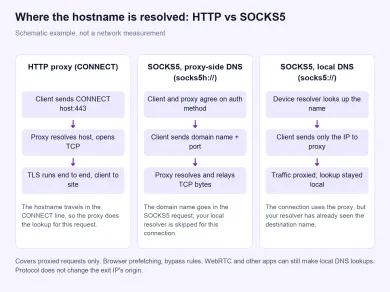
Schematic example, not a network measurement: where the destination name is resolved for proxied requests in each setup. It doesn't cover browser prefetching, bypass rules, WebRTC or other apps, which can still make local lookups.
03Client compatibility and authentication
Pick the protocol your client already speaks well. Bolting on support through extra packages or wrappers is a common source of "the proxy is broken" reports.
Browsers. Firefox has HTTP and SOCKS fields in its own proxy settings. Chromium-based browsers follow the system settings or a --proxy-server flag. Both handle CONNECT without fuss. SOCKS5 with username and password is the weak spot: built-in browser SOCKS settings may have no place to enter credentials, which is one reason people use proxy extensions or anti-detect browsers. Use one protocol per profile. Mixing an HTTP system proxy with a SOCKS5 extension in the same profile is an easy way to end up with some requests going through one route and some through the other.
Scrapers and HTTP libraries. Common HTTP clients such as curl accept an http://user:pass@host:port proxy out of the box and uses CONNECT for HTTPS on its own. In some libraries SOCKS5 needs an extra package or build option. If your stack only fetches web pages, the HTTP endpoint is the path with fewer surprises. Our web scraping guide covers the origin side of that choice.
Non-HTTP apps. Messaging apps, game launchers, mail clients, SSH and database tools aren't HTTP clients. When they support a proxy at all, it is often a SOCKS field rather than an HTTP one. That's where SOCKS5 is the better fit, and also for UDP traffic such as voice when the gateway actually implements UDP ASSOCIATE. SOCKS5 support on a plan doesn't by itself mean UDP is supported, so confirm that before you buy for UDP.
Authentication. HTTP proxies send credentials in a Proxy-Authorization header and reply 407 Proxy Authentication Required when they're missing or wrong. SOCKS5 negotiates a method first. RFC 1928 lists GSSAPI and USERNAME/PASSWORD as methods; a plan that gives you a login and password uses the latter, which is specified in RFC 1929.
SOCKS4 and SOCKS4a are different protocols with no password support, and a SOCKS4-only client can't complete a handshake with an endpoint that only speaks SOCKS5. IP allowlisting removes the need for a password, but it doesn't change the protocol. You need either an endpoint the provider explicitly documents as SOCKS4/SOCKS4a, typically paired with IP allowlisting, or a client that supports SOCKS5 or HTTP.
On a plain, unencrypted connection between your client and the proxy, the login isn't protected: HTTP Basic credentials are only Base64-encoded, and SOCKS5 username/password travels in clear text. Anyone on that network path can read them. An HTTPS proxy endpoint, meaning one where the client-to-proxy connection itself is wrapped in TLS, protects that hop, including the credentials. Either way, don't reuse proxy credentials anywhere important.
Speed. People often ask about "SOCKS5 vs HTTP proxy speed". The difference is small. Both add one handshake when the connection opens, and after that both forward bytes. In practice the distance to the gateway, the provider's load and the exit IP decide speed, not the protocol. Plain-HTTP proxies can feel faster when they cache, but that rarely applies to HTTPS.
SOCKS5 vs HTTPS. "HTTPS proxy" means two different things. Usually it means an HTTP proxy that tunnels HTTPS sites with CONNECT, which is everything described above. Sometimes it means the link between you and the proxy is itself wrapped in TLS, which hides your proxy credentials and target hostnames from the local network. Plain HTTP-proxy and SOCKS5 connections don't encrypt that first hop, so if hiding it matters, use a TLS-wrapped proxy endpoint if your provider and client support one, or a VPN for that segment.
04Which one to pick
| Your situation | Pick | Why |
|---|---|---|
| Browser that only loads websites | HTTP or SOCKS5 with remote DNS | Both work; use the one the profile handles natively |
| Python/Node/Go scraper fetching pages | HTTP | Built-in support, CONNECT for HTTPS, fewer dependencies |
| Telegram, games, mail, SSH, databases | SOCKS5 | Not HTTP clients; need a raw TCP tunnel |
| Voice or other UDP traffic | SOCKS5 with confirmed UDP support | CONNECT carries only TCP |
| Client only supports SOCKS4 | A documented SOCKS4/SOCKS4a endpoint (usually with IP allowlist), or a different client | SOCKS4 can't talk to a SOCKS5-only endpoint or send a password |
| Site blocks you on a hosting ASN | Change origin, not protocol | Same IP, same reputation, either way |
The last row is the mistake buyers make most often. Switching a datacenter IP from HTTP to SOCKS5 doesn't make it look like a household connection. If a site scores your network, change the exit type. Compare residential proxies, mobile proxies and datacenter proxies, or read residential vs datacenter proxies first.
05How to check which protocol you bought
Don't trust the port number. 8080, 3128, 1080 and high ports like 60000 get used for both protocols, and some gateways answer both on the same port.
-
Know your own IP first. Open my IP without the proxy so you have a baseline to compare against.
-
Check that the endpoint responds. Paste the provider's endpoint into the proxy checker as
HOST:PORTorHOST:PORT:USER:PASS. The checker runs on our server, tries supported protocols and reports the first successful one. A protocol prefix changes which protocol it tries first, but does not disable fallback. One successful result therefore does not prove that the endpoint accepts both HTTP and SOCKS5. To compare them separately, use the two curl commands below or a client that lets you force each protocol. If a check fails, inspect the error and verify credentials, IP allowlisting and plan restrictions before concluding that the protocol is unsupported. -
Check the same thing from the command line. Use one neutral test URL for both runs so the results are comparable:
# HTTP proxy: curl sends CONNECT for an https:// URL
curl -v -x http://USER:PASS@HOST:PORT https://example.com/ -o /dev/null

# SOCKS5 with proxy-side DNS (no local lookup)
curl -v -x socks5h://USER:PASS@HOST:PORT https://example.com/ -o /dev/null
In the verbose output of the first command, a
CONNECT example.com:443line followed by a 200 response confirms an HTTP tunnel. A 407 means the proxy speaks HTTP but rejected the credentials, which is an auth problem, not a protocol one. If the HTTP attempt fails right away with a malformed response whilesocks5h://connects, the endpoint most likely speaks SOCKS on that port; confirm against the provider's documentation. -
Compare exit IPs, not just pass/fail. Check that each protocol exits in the country and network type you paid for. On a rotating pool, two tests can show different IPs or even different networks regardless of protocol, so a mismatch alone doesn't prove separate pools. A sticky session makes a like-for-like comparison more likely, but it doesn't guarantee the same IP is kept between tests or after a reconnect.
-
Watch DNS during the same session. Use remote DNS (
socks5h://, or "Proxy DNS" in the client) and run a leak test. The how to check if a proxy works guide walks through DNS and WebRTC checks. -
Test IPv6 separately. SOCKS5 can carry an IPv6 destination, but only if the gateway has IPv6 egress. A dual-stack listing needs a dual-stack test.
Here is a hypothetical worked example of how to read the results. Say a plan lists one gateway host with two ports, and you run both curl commands above against the same test URL. These patterns are illustrations, not results from any real provider:
| What you see (hypothetical) | What it may mean | What to do next |
|---|---|---|
HTTP port: CONNECT then 200; SOCKS port: handshake succeeds | Each port speaks the protocol the plan lists | Pick the one your client supports natively |
| HTTP port: 407 Proxy Authentication Required | Port speaks HTTP; login rejected | Recheck username, password and any session suffix the provider documents |
HTTP port: malformed reply; socks5h:// connects | That port most likely speaks SOCKS, not HTTP | Confirm in the provider's docs before switching clients |
| Both fail with valid-looking credentials | Allowlist, plan scope or client issue, not necessarily protocol | Check IP allowlist and plan settings, then retest |
| Both pass, different exit IPs or networks | Normal on a rotating pool | Compare country and network type, not the exact IP |
A short checklist before you settle on a protocol:
- Your client has a native setting for this protocol, including a username and password field if the plan uses them.
- DNS for proxied requests is resolved at the proxy (
socks5h://or "Proxy DNS" for SOCKS5), and a leak test was run with the real browser or app. - The ports you need are allowed: CONNECT targets on an HTTP endpoint, UDP on a SOCKS5 endpoint if you need it.
- The exit country and network type match the plan, judged separately from the protocol.
- The link from your device to the proxy is protected (TLS proxy endpoint or VPN) if credentials crossing that network is a concern.
Protocol is a compatibility choice, origin is an access choice, and session mode (sticky or rotating) is a flow choice. Decide them in that order and you won't pay extra for SOCKS5 thinking it's a cleaner IP.
06Providers that offer both HTTP and SOCKS5
Before buying, check each provider's documentation for which protocols the plan includes, the ports or hostnames for each, UDP support, and whether IP allowlisting is available if your client needs it.

SOAX sells rotating residential and mobile proxies on a shared credit pool, with datacenter and ISP in the same plans. Builder starts at $200/mo + VAT (200 credits); Tier 1 traffic is $3/GB on Builder.

Bright Data is a large proxy network for data collection: residential, mobile, ISP and datacenter IPs in about 195 countries. Residential traffic can be paid as you go with no subscription, and datacenter and ISP addresses come in packs from 10 IPs. Residential and mobile access requires identity verification.

Oxylabs sells residential, mobile, ISP and datacenter proxies under one monthly subscription from $30. Buyer payments: cards, wire transfer, AliPay, PayPal.

Decodo (formerly Smartproxy) sells residential and datacenter proxies. Residential: $4/GB without a monthly plan, or monthly packs from $3.75/GB for 3 GB. Payments: cards, PayPal, Alipay, Google/Apple Pay, crypto (with limits).
What is the main difference between SOCKS5 and HTTP proxies?
Is SOCKS5 faster than an HTTP proxy?
Does SOCKS5 prevent DNS leaks?
Is SOCKS5 more anonymous than HTTP?
What is the difference between SOCKS5 and an HTTPS proxy?
Can I use the same proxy over both HTTP and SOCKS5?
Related articles
AI proxy vs LLM gateway: what is the difference?
Tell network forwarding, an API gateway, and model routing apart so you pick the layer that matches the job.
Gemini network proxy: configure and diagnose a client connection
Route google-genai through an HTTP CONNECT proxy, keep TLS on, and tell a dead hop from an API refusal without treating a tunnel as Google access.
curl proxy setup: authentication, HTTPS CONNECT and reliable checks
Set an explicit curl proxy, keep -U apart from -u, send HTTPS through CONNECT without -k, and read exit codes against the route you actually used.