curl proxy setup: authentication, HTTPS CONNECT and reliable checks
Set an explicit curl proxy, keep -U apart from -u, send HTTPS through CONNECT without -k, and read exit codes against the route you actually used.
This guide is for people who already have curl on the PATH and need an HTTP or SOCKS hop they can prove. The checks below used a local loopback origin and dummy proxies, not a vendor account. Top Proxy does not sell IPs, and there are no free keys here. A browser What is my IP page shows the browser route, not this curl process.
01Run the checks on a living proxy
The numbers in this article came from a controlled loopback measurement on curl 8.7.1. That measurement is methodology. It is not a kit on this page, and there is no public download.
Use ordinary curl against a proxy and origin you still have running. Dummy lab-user:lab-pass is a label, not an account. Put your live host, port, and CA in the command. Do not reuse the 60585-family ports from the recorded pass. Those endpoints were gone when the measurement finished.
curl -q -sS --noproxy '' -x http://127.0.0.1:PROXY_PORT --proxy-user lab-user:lab-pass http://127.0.0.1:ORIGIN_PORT/identity
HTTPS through the same HTTP hop still uses CONNECT. Trust the CA that matches the origin you are talking to right now.
curl -q -sS --noproxy '' -x http://127.0.0.1:PROXY_PORT --proxy-user lab-user:lab-pass --cacert ca.pem https://localhost:ORIGIN_HTTPS_PORT/identity
02Set an explicit HTTP proxy and verify the route
Start curl with -q as the first option. The installed 8.7.1 man curl and the curl man page both say first-position -q skips curlrc. Online manuals can describe newer flags. This walkthrough stays on 8.7.1. If your rc file injects a proxy, a CA bundle, or --user, every later flag is arguing with a ghost. Do not rewrite HOME to hide the file. -q is the isolation the binary already gives you.
Point at the hop with -x / --proxy. With no scheme, curl treats the host as an HTTP proxy. HTTP proxies in everything curl describe absolute-form forwarding for HTTP targets. The lab's alpha proxy logged GET http://127.0.0.1:60585/identity and then returned the origin JSON. Status 200 by itself is not the route. The origin echoed via_proxy_header: alpha. A second instrumented proxy named beta stayed idle on that call.
- Run
curl -q --versionand keep the libcurl line. This walkthrough used curl 8.7.1, libcurl 8.7.1, SecureTransport plus LibreSSL 3.3.6. Features listedHTTPS-proxy. That flag is about TLS to a proxy. It does not prove SOCKS, and it does not prove CONNECT. - Call the origin without
-xonce. Direct HTTP returned exit 0, HTTP 200, origin idhttp-origin, and the dummy proxy received nothing. That is the control. - Call the same URL with
-x,--noproxy '', and dummy--proxy-user.--noproxy ''forces the proxy even when a shellNO_PROXYwould skip loopback. The origin body named alpha. The hop consumed Proxy-Authorization. The origin did not see it. - Read the proxy log, not only stdout. Missing credentials on this fixture returned HTTP 407 with curl exit 0 because
--failwas off.
curl -q -sS --noproxy '' -x http://127.0.0.1:PROXY_PORT --proxy-user lab-user:lab-pass http://127.0.0.1:ORIGIN_PORT/identity
PROXY_PORT and ORIGIN_PORT must come from a fixture that is still up. They are not the expired ports in the saved results.
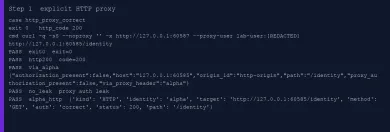
Wrong dummy credentials also returned 407 and exit 0. The fixture marked auth: wrong. Correct credentials returned origin 200 and auth: correct. Reserved characters in the dummy password went through --proxy-user, not through a pasted URL. Component-wise URL encoding is the other legal path. Do not put real passwords in argv if you can avoid it. Process listings still see the argument for a moment. The 8.7.1 manual says so.
If you only need to know whether a host answers HTTP at all, use the proxy checker. It is a reachability tool. It is not this curl process.
03Keep proxy authentication separate from origin authentication
-U / --proxy-user authenticates to the proxy. -u / --user authenticates to the origin. Proxy authentication in everything curl treats those as independent on purpose. Mixing them is how you leak a gateway password into an application login, or the reverse.
The lab origin served /origin-auth with its own Basic challenge. One command sent dummy -U to alpha and dummy -u to the origin. The origin JSON said origin_authorized: true and proxy_authorization_present: false. The hop consumed Proxy-Authorization. The origin never saw it.
- Put proxy credentials on
-Uor in the proxy URL userinfo, never on-u. - Put origin credentials on
-u, a netrc you actually intended, or the origin URL. This lab used an empty private netrc and no--netrc, so a surprise login would have been a bug. - Confirm the origin. A 200 from the proxy with a 401 from the origin is a different failure than a 407 from the hop.
curl -q -sS --noproxy '' -x http://127.0.0.1:PROXY_PORT --proxy-user lab-user:lab-pass -u origin-user:origin-pass http://127.0.0.1:ORIGIN_PORT/origin-auth
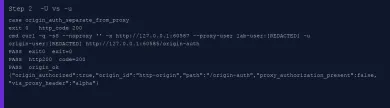
HTTP 407 without --fail left curl at exit 0 on this build. Adding -f on the same missing-credential call returned HTTP 407 and exit 22. The installed manual warns that 401 and 407 can slip through --fail. They did not slip on 8.7.1 in this run. Do not universalize that to every future curl. Record status, CONNECT status, and exit separately. --fail-with-body is the sibling that still writes the document. It was not the default here.
Dummy users in this article are labels. They are not accounts. Verbose traces in the lab had Authorization and Proxy-Authorization values stripped to [REDACTED] before any file hit disk.
04Reach HTTPS through CONNECT without disabling TLS
An HTTPS website in front of an HTTP proxy is still an HTTP proxy. curl sends CONNECT host:port, the proxy opens TCP, then TLS runs to the origin through that tunnel. You do not need an https:// proxy scheme for that. The https:// proxy scheme is TLS to the proxy itself. everything curl on HTTP proxies and the HTTPS proxy chapter keep those hops apart. This lab did not stand up an HTTPS proxy. --proxy-cacert stayed unmeasured. --cacert verified the origin after CONNECT.
- Keep
-xonhttp://127.0.0.1:PORTeven when the URL ishttps://localhost:PORT/identity. - Trust the lab CA with
--cacert. Do not add-k. - Require a CONNECT log line before you trust the 200. Alpha recorded
CONNECT localhost:60586withauth: correctand status 200, then the origin body namedhttps-origin. - Repeat once without
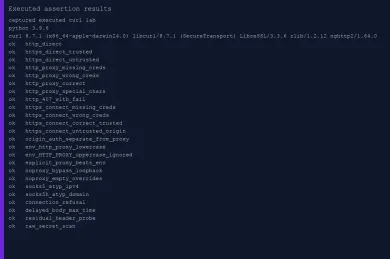
--cacert. CONNECT still succeeded. curl then exited 60, the TLS peer-certificate failure. The tunnel was fine. The certificate was not.
curl -q -sS --noproxy '' -x http://127.0.0.1:PROXY_PORT --proxy-user lab-user:lab-pass --cacert ca.pem https://localhost:ORIGIN_HTTPS_PORT/identity
--cacert must be the CA from a fixture that is still running. Do not point it at leftover evidence/ca.pem after the one-shot launcher has exited, and do not reuse the deleted temporary path from the recorded run.
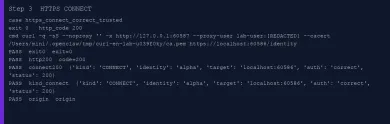
Missing proxy credentials on CONNECT did not look like the HTTP 407 plus exit 0 path. The fixture still answered 407 on CONNECT. curl 8.7.1 exited 56, and the write-out HTTP code was 000. Wrong credentials did the same. Treat CONNECT failures as transport, not as a quiet HTML 407 you can parse later.
Direct HTTPS with the lab CA returned 200. Direct HTTPS without it returned exit 60. That pair is the TLS baseline. It is independent of the proxy.
A browser What is my IP tab still will not show this tunnel. If you wanted the browser, you would configure the browser.
05Understand environment proxies and intentional bypass
curl reads http_proxy, https_proxy, all_proxy, and NO_PROXY. Proxy environment variables are blunt about the CGI trap. Incoming Proxy: headers become HTTP_PROXY in uppercase. curl therefore accepts only lowercase http_proxy for HTTP. Uppercase HTTPS_PROXY and ALL_PROXY remain valid for their schemes.
The lab started every child from a clean environment. It stripped both cases of the proxy variables, CGI REQUEST_METHOD leftovers, CURL_CA_BUNDLE, SSL_CERT_FILE, SSL_CERT_DIR, SSLKEYLOGFILE, and REQUESTS_CA_BUNDLE. Then it injected one named dummy at a time. curl has no trust_env= switch. Requests trust_env=False also changes CA and netrc lookup. Do not copy that flag onto curl. -q plus a clean child env is the equivalent isolation.
- Set lowercase
http_proxyto alpha, pass--proxy-user, and add--noproxy ''. The origin named alpha. That is environment-only routing. - Set uppercase
HTTP_PROXYto the same alpha URL and omit-x. The origin came back direct. Alpha's event count did not move. That is the documented security convention, measured on this binary. - Set
http_proxyto alpha and pass explicit-xbeta. The origin named beta. Alpha was not the selected hop. Two proxy identities beat a 200-from-somewhere guess. - Set
http_proxyto alpha andNO_PROXY=127.0.0.1without--noproxy ''. The origin was direct and alpha stayed idle. That is the bypass case, run on purpose. - Keep
NO_PROXY=127.0.0.1and add--noproxy ''. The empty list overrides the variable, as the 8.7.1 manual says since 7.53.0. The origin named alpha again.
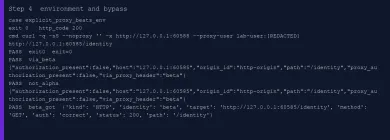
Never infer the hop from HTTP 200. Direct and proxied success look the same in the body unless you stamped the route. The fixture stamped X-Lab-Proxy on forwarded HTTP. CONNECT cannot stamp the origin inside TLS, so the CONNECT log is the evidence.
06Compare SOCKS5 and SOCKS5h with handshake evidence
SOCKS is not HTTP forwarding and it is not CONNECT. The SOCKS chapter in everything curl keeps the table short. SOCKS5 resolves locally. SOCKS5h sends the hostname to the proxy. --socks5 and --socks5-hostname are the flag forms. socks5:// and socks5h:// on -x are the URL forms.
Apple's curl 8.7.1 omits socks from the protocol list and still ships the SOCKS proxy options. A successful SOCKS request is not proof of where DNS happened. The handshake ATYP is.
--socks5 127.0.0.1:PORTtohttp://127.0.0.1:ORIGIN/identitycompleted with HTTP 200. The fixture recorded ATYP ipv4 and address127.0.0.1.--socks5-hostname 127.0.0.1:PORTtohttp://lab.curl-fixture.test:ORIGIN/identitycompleted with HTTP 200. The fixture recorded ATYP domain and addresslab.curl-fixture.test. The proxy mapped that lab hostname to loopback. That mapping is fixture plumbing, not a measured leak to public DNS.- Stop there. This article does not claim an external resolver capture.
curl -q -sS --noproxy '' --socks5-hostname 127.0.0.1:SOCKS_PORT http://lab.curl-fixture.test:ORIGIN_PORT/identity
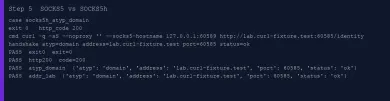
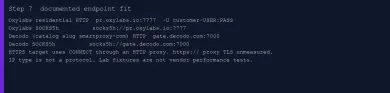
Provider docs follow the same split. Oxylabs residential protocols document socks5h://pr.oxylabs.io:7777 as passing the hostname, and socks5:// as passing a resolved IP. Decodo residential protocols, still listed in the catalog as Smartproxy, document socks5h:// on gate.decodo.com:7000 and say country hosts such as us.decodo.com do not work for SOCKS5. Those are documented fit notes. They are not this loopback run.
Protocol is not IP type. Mobile and residential pages describe exit pools. SOCKS5 versus HTTP is the client handshake. You can have a residential HTTP hop or a datacenter SOCKS hop. Do not collapse those knobs.
07Distinguish connection failure from transfer timeout
--connect-timeout bounds DNS plus TCP plus, for TLS, the handshake. --max-time bounds the whole transfer. Timeouts in everything curl say --max-time still fires while data is moving. Exit 28 is that timer. It is not a Requests-style read timeout.
This lab did not measure a connect timeout and did not capture packets. Exit 7 came from a TCP connect to an ephemeral loopback port owned by a UDP socket. curl printed Couldn't connect to server with HTTP code 000. That is a connection error. It is not exit 28.
The delayed-body path is the other shape. /slow-body sent complete headers immediately, flushed the first body byte H, then waited past --max-time 1.5 before the rest. curl reported HTTP 200, not 000, and exited 28. The origin first-byte event was set. Alpha had forwarded GET .../slow-body. That is a transfer timeout after the body started.
- For a dead hop, expect a connect error. Here it was exit 7 against an owned loopback port.
- For a slow body, require headers and a first byte, then
--max-time, then exit 28 with a real HTTP 200. Code 000 would have failed the assertion. - Leave
--connect-timeoutas documented unless you actually stall the handshake. This run did not.
curl -q -sS --noproxy '' -x http://127.0.0.1:PROXY_PORT --proxy-user lab-user:lab-pass --max-time 1.5 http://127.0.0.1:ORIGIN_PORT/slow-body
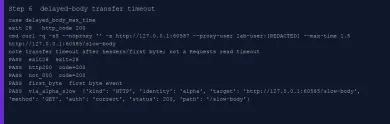
Retries are a separate switch. --retry resets the --max-time counter per attempt on 8.7.1. Bound the retry window with --retry-max-time if you turn it on. Do not treat a retry flag as idempotency for POST.
08Choose an endpoint using documented protocol and auth fit
Pick the hop the way the vendor documents it, then prove curl against a fixture you own. Paid gateways were not called. Country targeting, anti-bot folklore, and "best service" rankings are out of scope.
Oxylabs residential protocols, fetched 14 October 2026, put HTTP on pr.oxylabs.io:7777 with -U customer-USERNAME:PASSWORD. The same page adds https://pr.oxylabs.io:7777 when you want TLS to the gateway, and socks5h://pr.oxylabs.io:7777 when the proxy should see the hostname. SOCKS5 does not use country-specific entry hosts on that page.
Decodo residential protocols, same day, put HTTP on gate.decodo.com:7000 and SOCKS5h on that same host. Compare those documented schemes on the live English cards for Oxylabs and Smartproxy / Decodo. That is catalog fit, not a gateway test.
- Match scheme to client support. curl 8.7.1 here spoke HTTP forwarding, CONNECT, SOCKS5, and SOCKS5h. TLS to an HTTPS proxy remains a docs-only row.
- Match auth to
-U, with username prefixes the vendor documents. Origin-ustays off that string. - Check the hop with the proxy checker if you only need HTTP versus SOCKS on a host. Check the exit IP in curl, not in a browser tab. Prove the hop on a living proxy you own before you point curl at any paid endpoint.

Oxylabs sells residential, datacenter and mobile proxies. Residential self-serve starts at $6/GB for 5 GB/month. Buyer payments: cards, wire, AliPay, PayPal.

Decodo (formerly Smartproxy) sells residential and datacenter proxies. Residential: $4/GB without a monthly plan, or monthly packs from $3.75/GB for 3 GB. Payments: cards, PayPal, Alipay, Google/Apple Pay, crypto (with limits).
| Observation | HTTP status | CONNECT status | curl exit | What to change |
|---|---|---|---|---|
| HTTP proxy, correct dummy user | 200 | n/a | 0 | Route is proven only if the proxy identity matches |
| HTTP proxy, missing or wrong user | 407 | n/a | 0 without -f; 22 with -f on 8.7.1 | Fix -U. Do not assume every 407 becomes 22 |
| HTTPS via HTTP proxy, trusted CA | 200 | 200 Connection Established | 0 | Keep --cacert on the origin. Do not add -k |
| HTTPS via HTTP proxy, missing proxy user | 000 | 407 | 56 | CONNECT 407 is a transport failure on this build |
| HTTPS, CONNECT ok, untrusted origin | 000 | 200 | 60 | Fix the CA. The tunnel already worked |
Uppercase HTTP_PROXY only | 200 direct | n/a | 0 | Use lowercase http_proxy or explicit -x |
| TCP connect refused on owned port | 000 | n/a | 7 | Connection error. Not a timeout |
Headers and first byte, then --max-time | 200 | n/a | 28 | Transfer budget. Not a connect failure |
How do I configure a proxy in curl?
Can HTTPS use an HTTP proxy?
How do -U and -u differ?
Why does curl ignore uppercase HTTP_PROXY?
Where does socks5h resolve the hostname?
What do --connect-timeout and --max-time limit?
Related articles
AI proxy vs LLM gateway: what is the difference?
Tell network forwarding, an API gateway, and model routing apart so you pick the layer that matches the job.
Gemini network proxy: configure and diagnose a client connection
Route google-genai through an HTTP CONNECT proxy, keep TLS on, and tell a dead hop from an API refusal without treating a tunnel as Google access.
HTTPX proxy setup: authentication, environment and timeouts
Set an HTTPX proxy with proxy=, pass credentials, keep HTTPS on CONNECT, and tell environment defaults apart from explicit mounts and timeouts.