Sticky vs rotating proxies: session control explained
Sticky vs rotating proxies: how per-request and timed rotation work, when a sticky session beats a new IP, how cookies interact with IP changes, and how to test a session ID yourself.
Rotating IPs spread requests across a pool. Sticky sessions try to hold one address for a window. This guide is for people who buy proxy access for scraping, account work or QA and need to choose a session mode. Top Proxy is a comparison catalog: we do not sell IPs and we do not hand out free keys. We explain the mechanics and point you to providers you can check yourself.
Session control is separate from where the IP comes from. A residential pool can rotate or hold. A mobile pool can do the same. A datacenter plan is often sold as a static address for the rental, though the exact terms depend on the product. Buyers mix these words and then wonder why a checkout flow dies halfway through.
01Rotating, sticky and static: three different behaviors
These terms get used as if they were synonyms. They describe different things.
| Mode | What the gateway does | Who controls the change | Typical fit |
|---|---|---|---|
| Rotating per request | Selects an exit from the pool for each connection or request; it can return the same address again | The gateway | Independent page fetches, wide URL lists |
| Rotating on a timer | Selects a new exit from the pool when an interval ends; the pick can repeat | Provider setting or your parameter | Short flows that tolerate a mid-run change |
| Sticky session | Tries to keep the same exit while you send the same session ID | You, through the session ID | Logins, carts, multi-step forms, paginated results tied to cookies |
| Static | Aims to keep the same address across sessions for the rental term | The product terms | Long-lived accounts, allowlisting |
| Dedicated | Reserves an address (static or not) for your use only | The product terms | Cases where shared use of the IP is the problem |
The important column is the third one. With per-request rotation you do nothing and the gateway picks again, which usually but not always means a different IP. With a sticky session you send a signal on every request, and the provider tries to honor it. Static describes continuity of the address; dedicated describes exclusivity. Neither is a promise against outages or reassignment, which remain subject to the product and contract.
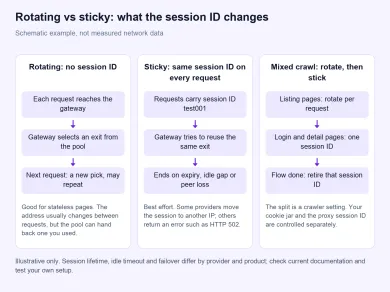
Schematic example of how a gateway treats requests with and without a session ID. It is an editorial diagram, not measured network data; real lifetimes and failover depend on the provider.
02How rotation works: per request vs on a timer
A rotating gateway is one hostname and port in front of a large pool. Each time a new session starts, the gateway selects an exit from that pool. Without a session key, many residential gateways treat every connection as new, so consecutive requests can leave from different addresses, though the pool can also hand back one you just used. The exact default differs by provider, so read the product page rather than assuming.
Per-request rotation suits jobs where each fetch stands on its own: product pages, public documentation, search result pages, price snapshots. The site should not need the next request to come from the same household. This is what most people mean by proxy rotation for web scraping.
Timed rotation sits in between. The exit is meant to hold for a set number of minutes, then the gateway selects again. Some providers expose this as a port range, others as a username parameter. It reduces how often the target sees a new address, but you do not control the switch moment, so a flow that crosses the boundary can still break.
Rotation does not hide a noisy client. If your crawler fires a burst of requests, the destination still sees a burst, only spread over more addresses. Rate limits, sensible concurrency and polite retry logic still belong in your own code.
03Sticky sessions vs a static IP
A sticky session pins you to one exit for a window, or until you change the session ID. Providers usually encode it in the proxy username. Two documented examples show how much the details vary:
- Oxylabs residential proxies take a
sessidvalue in the username, with an optionalsesstimein minutes. Their session control documentation says a default session lasts 10 minutes or ends after 60 seconds without requests, andsesstimecan extend it up to 1440 minutes. If the IP goes offline, a regular session moves to another IP and continues; a separatesessid_oneipmode does not rotate and returns an HTTP 502 instead. - Bright Data adds
-session-<id>to the username. Their proxy configuration options say each unique session ID gets a unique IP, and a-constflag keeps the same peer, returning a 502 with "no peer available" if that peer drops. The page does not state a session lifetime.
A sticky session is best effort. The peer can go offline, a mobile carrier can re-assign the address, and the provider decides whether to swap the exit or fail loudly. Treat any hold time as a target, not a lease, and do not read it as a promise that a login or account stays safe.
Sticky is also not the same as static or dedicated. Other customers may share the same range, and the address may go back to the pool after your session. If you need address continuity, look at static or ISP products; if you need exclusivity, look for a dedicated option. Check the terms either way, because outages and reassignment are handled per product. Our ISP vs residential proxies guide covers that trade-off.
04Cookies, logins and what happens when the IP changes
Most sites track a visitor with cookies, not only with an IP. That is why a mid-flow IP change is risky: the cookie says "same user", the network says "different location". Some sites accept that. Others treat it as a stolen session, force a new login, or reset a cart.
Your HTTP client controls the cookie half. In Python, a requests.Session object persists cookies across requests and reuses connections, according to the Requests advanced usage docs. The proxy session ID controls the IP half. They are independent. You can keep cookies while the IP rotates, or keep the IP while starting with an empty cookie jar. Pick the combination on purpose:
- New cookie jar + rotating IP: removes the cookie and IP links between requests. Good for stateless crawling. It is a configuration, not invisibility: browser or client fingerprints, headers and account identifiers can still correlate requests.
- One cookie jar + sticky IP: looks like one visitor who stays put. Good for logins, carts and multi-page forms.
- One cookie jar + rotating IP: the risky mix. A site that binds cookies to an IP may challenge or log you out.
- New cookie jar + sticky IP: fine for testing how a site treats an address before you log in.
Rotation also has a cost beyond cookies: you lose any reputation an address built with the site, which on some targets means a new challenge on every page.
Account work usually wants sticky or static, and often a residential or mobile origin. A rotating datacenter IP is the combination many login walls already expect from automation.
05Proxy rotation for web scraping: picking the mode per job
Most real crawlers use both modes. Rotate across listing pages that need no state. Switch to a sticky session for detail pages, logins or anything behind a cookie. That split is a crawler setting, not a vendor feature; the provider only has to expose both. Our web scraping proxy guide covers the rest of the buying decision.
| Job | Suggested mode | Why |
|---|---|---|
| Public product or search pages | Rotating per request | No state to keep, load spreads across exits |
| Price monitoring by region | Rotating with a country filter | Location matters, continuity does not |
| Login, then a few pages | Sticky, hold slightly longer than the flow | Cookies and IP stay consistent |
| Checkout or multi-step form | Sticky, new session ID per run | A mid-flow change can reset the form |
| Long-running browser profile | Static or long sticky | Hours of continuity are needed |
| Allowlisting on a partner API | Static (dedicated if exclusivity matters) | The allowlist needs a stable address |
A practical rule: measure how long your flow takes, set the sticky window a little longer, and generate a new session ID when the flow ends. Holding a session longer than you need keeps you on an address that may already be flagged.
Worked example (hypothetical numbers). Say a login plus six detail pages takes about 4 minutes in your logs, and one step waits about 90 seconds for a report to build. Against the Oxylabs documented default (10 minutes, or 60 seconds without requests), the total fits, but the 90-second gap would exceed the idle limit, so the session could end mid-flow. The fixes are to set a longer sesstime and check how that provider treats idle gaps, or to keep requests flowing during the wait. Other providers use different limits, so redo this arithmetic with their documented values.
If you are unsure, run a control: same URL set, same IP origin, two session modes. Before you start, decide what to log for each run:
Log this → Why it matters
- 01Session ID and timestamp per requestLets you tie IP changes to idle gaps or expiry
- 02Exit IP and countryShows rotation, stickiness and pool drift
- 03Protocol (HTTP or SOCKS5)Keeps protocol separate from IP origin
- 04HTTP status and challenge pagesSeparates proxy errors from site defenses
- 05Cookie or login state after each stepShows whether a flow survived an IP change
Keep the mode that completes the job.
Country filters still apply while rotating. A US rotating pool should stay in the United States, but mixed pools can drift, so spot-check the country on a few requests.
06How to test a sticky session with a series of requests
Do not trust a product page alone. Send the same session ID several times, then send requests without it, and log the exit IP each time. The sketch below uses Python Requests. The proxy host, username format and IP-echo URL are placeholders; replace them with values from your provider's documentation, because the session syntax differs between vendors.
import time
from urllib.parse import quote
import requests

PROXY_HOST = "gw.example-provider.com:7777"   # placeholder
USER = "USERNAME"                              # placeholder
PASSWORD = "PASSWORD"                          # placeholder, load from your secret store
IP_ECHO_URL = "https://ip-echo.example/plain"  # placeholder endpoint that returns your IP

def proxies_for(session_id=None):
    # Session syntax is provider-specific; this mirrors a "-session-<id>" style username.
    user = f"{USER}-session-{session_id}" if session_id else USER
    # Percent-encode credentials so characters like @ or : do not break the URL.
    url = f"http://{quote(user, safe='')}:{quote(PASSWORD, safe='')}@{PROXY_HOST}"
    return {"http": url, "https": url}

def exit_ip(session_id=None):
    # Pass proxies per request: session-level proxies can be overridden by env proxy variables.
    r = requests.get(IP_ECHO_URL, proxies=proxies_for(session_id), timeout=(5, 20))
    r.raise_for_status()
    return r.text.strip()

for i in range(5):                 # bounded series, no retry loop
    print("sticky", i, exit_ip("test001"))
    time.sleep(10)

for i in range(5):
    print("no session", i, exit_ip())
TLS verification stays on, which is the Requests default. The per-request proxies argument matters: the Requests docs warn that values set on session.proxies can be overwritten by environment proxy settings.
Read the results with care:
- Same IP across the sticky series and different IPs without a session ID is what most residential gateways aim for.
- A change in the sticky series before the advertised window is a signal worth raising with the provider, but one run is not proof. Peers drop, and some providers swap exits silently by design.
- A new session ID does not guarantee a different address. Pools can hand back an IP you saw before.
- One idle pause that ends a session does not tell you the exact timeout. Repeat with different pauses before you draw a conclusion.
- An unchanged exit IP in the no-session series does not by itself prove routing failed. Some gateways hold an exit per connection.
Test with the same protocol you will use in production, because HTTP and SOCKS5 endpoints can behave differently. Our SOCKS5 vs HTTP proxies guide explains the difference. For a quick manual check, open My IP through the proxy; it shows the address for that one request, so refresh it to compare. The proxy checker tests an endpoint from our side, which is useful for confirming the proxy answers, but its result reflects where the checker connects from and does not isolate problems in your own browser or client.
07Catalog candidates to check for session control
The services below are residential or mixed-pool providers from our catalog. Session control is documented for some of them, and the details differ. For each card, check the provider's current documentation for the session modes on offer, the session syntax, the maximum hold time and what happens on failover. Listing here does not mean we tested your setup.

SOAX sells rotating residential and mobile proxies on a shared credit pool, with datacenter and ISP in the same plans. Builder starts at $200/mo + VAT (200 credits); Tier 1 traffic is $3/GB on Builder.

Decodo (formerly Smartproxy) sells residential and datacenter proxies. Residential: $4/GB without a monthly plan, or monthly packs from $3.75/GB for 3 GB. Payments: cards, PayPal, Alipay, Google/Apple Pay, crypto (with limits).

Froxy offers residential, mobile, fast residential and datacenter proxies billed by traffic, with monthly packages and a paid trial $1.99 / 3 days / 100 MB.

Oxylabs sells residential, mobile, ISP and datacenter proxies under one monthly subscription from $30. Buyer payments: cards, wire transfer, AliPay, PayPal.

Bright Data is a large proxy network for data collection: residential, mobile, ISP and datacenter IPs in about 195 countries. Residential traffic can be paid as you go with no subscription, and datacenter and ISP addresses come in packs from 10 IPs. Residential and mobile access requires identity verification.
Pick rotating when each request can stand alone. Pick sticky when the next request must look like the same visitor. Pick static or dedicated when address continuity or exclusivity is what you are renting. Origin comes first, session mode second, the vendor third.
What is the difference between sticky and rotating proxies?
How long does a sticky proxy session last?
Does a new session ID always give me a new IP?
Should I use rotating proxies for web scraping?
Is a sticky session the same as a static IP?
Why did my sticky session change IP early?
Related articles
AI proxy vs LLM gateway: what is the difference?
Tell network forwarding, an API gateway, and model routing apart so you pick the layer that matches the job.
Gemini network proxy: configure and diagnose a client connection
Route google-genai through an HTTP CONNECT proxy, keep TLS on, and tell a dead hop from an API refusal without treating a tunnel as Google access.
curl proxy setup: authentication, HTTPS CONNECT and reliable checks
Set an explicit curl proxy, keep -U apart from -u, send HTTPS through CONNECT without -k, and read exit codes against the route you actually used.