ISP proxies vs residential proxies: static IP or rotating pool?
What ISP proxies mean, how a static IP differs from a sticky residential session, and how per-IP and per-GB billing change the choice for long sessions.
You are choosing between an ISP proxy and a residential pool, and the product pages use overlapping words. This guide explains what each label usually means, why "static" and "sticky" are different promises, and how the billing unit changes the math. Top Proxy compares services. It does not sell IPs or give out free keys.
01What a provider means by "ISP proxy"
"ISP proxy" isn't a standard term, so read each vendor's definition. Bright Data's documentation is one of the clearer ones. It says its ISP network is built of residential IPs bought or leased from Internet Service Providers for commercial use, and that these addresses are actually hosted on servers. The same page claims target sites classify ISP IPs much like residential IPs. That's the vendor's own description. It doesn't guarantee how any particular site will treat a given address.
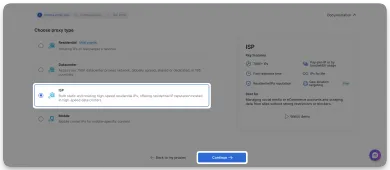
Bright Data's own onboarding screen with ISP selected, from its ISP quickstart documentation. This is the vendor's published screenshot, not our account or a test, and the source doesn't state the UI version. The grey overlay and highlight are in the original. Figures such as "700K+ IPs" and labels such as "IPs for life" are the vendor's marketing claims, not guarantees.
Notice the wording on that option: "both static and rotating." The ISP label describes where the addresses come from, not how they behave. Bright Data's ISP configuration guide lists three types. Shared is a rotating pool billed per GB of usage. Shared unlimited and Dedicated unlimited are allocated sets of specific proxies billed per proxy; the first is shared with other customers, the second is exclusive to you. So "ISP" alone tells you neither whether the IP stays put nor how you'll pay. This article compares a static ISP allocation with a rotating residential pool, because that's the choice most buyers are actually making.
Read that way, the label has two parts. The origin is an address block registered to an internet provider rather than a cloud host. The hosting is infrastructure the vendor runs, not a peer device in somebody's home. Vendors sell this under other names too, such as "static residential" or "dedicated ISP", and the names don't line up from one company to the next.
A rotating residential proxy works differently. You connect to a gateway, and the gateway forwards your request through an exit drawn from a pool of household connections. Exits come and go as those devices go online and offline. The pool is the product, and you don't hold any one address in it. For a fuller explanation of pools, see what residential proxies are.
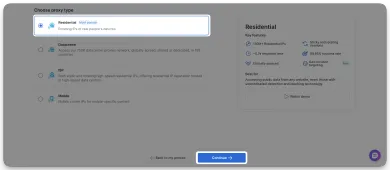
The same Bright Data screen with Residential selected, from its residential quickstart documentation. It's a published vendor screenshot, not our account or a test, and the UI version isn't stated. Compare the two option descriptions: Residential is "rotating IPs of real people's devices," while ISP covers both static and rotating IPs hosted in data centers. Success-rate and response-time figures in the panel are vendor claims we haven't verified.
So the short answer to "ISP proxies meaning" is this: an address with internet-provider registration, hosted on vendor infrastructure. Origin and session behavior are separate. Many ISP products are sold as a static allocation the vendor intends to keep stable for your plan, but some, like Bright Data's Shared ISP pool, rotate. Exclusive use isn't part of the definition either. Whether an ISP address is shared with other customers or dedicated to you is a separate question the listing has to answer.
| Question | Static ISP allocation | Rotating residential |
|---|---|---|
| Where the exit lives | Vendor-run infrastructure on ISP-registered space (as Bright Data describes its product) | Household or peer devices in a shared pool |
| What you receive | An address or list of addresses, sometimes reached through a vendor gateway | Gateway hostname and port; the exit is selected per request or per session |
| Expected behavior | The same IP across requests for the plan term, as the vendor describes it | Exit chosen per request or per session; consecutive requests can still land on the same exit |
| Shared or dedicated | Depends on the plan; ask | Shared by design |
| Typical billing unit | Per IP per period (a rotating ISP pool may bill per GB instead) | Per GB of traffic |
| Weak spot | Few addresses; reputation builds up on each one | Session continuity is best effort |
02Static IP vs sticky session: why they are not the same promise
This is where most buyers get confused. "Static residential vs rotating residential" sounds like a choice between two pools. In practice, rotating products offer a sticky mode, and sticky is easy to mistake for static.
Oxylabs documents its residential sticky sessions in some detail, and they make a useful reference. By default its residential proxies rotate with every request. Adding a sessid value to the username keeps the same exit, but by default the session lasts 10 minutes or ends after 60 seconds without requests, whichever comes first. A sesstime parameter extends that to as much as 1,440 minutes. The same page notes that an exit node may disconnect before the timer runs out, in which case the session moves to a new IP. A stricter sessid_oneip mode returns an HTTP 502 instead of switching IPs when the exit drops. All of this describes Oxylabs' residential product. Other vendors set their own defaults and limits.
Three practical points follow.
- Sticky is a request, not a guarantee. A pool can keep your exit only while that device stays online. A long timer is a limit on how long you may stay, not a promise that you will.
- Session syntax is provider-specific.
sessidandsesstimebelong to Oxylabs. Other vendors use other parameter names, ports, or dashboard toggles. Starting a new session doesn't guarantee a different IP either, because a pool can hand back an address you've already used. - One idle observation doesn't tell you the real timeout. If an IP changed once after a pause, that's one data point. Repeated logging and the vendor's documented rules tell you more.
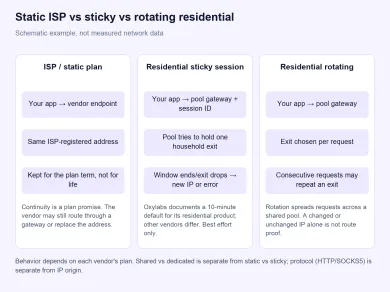
Schematic example only, not measured network data. Real behavior follows each vendor's plan and documentation.
Static is a different kind of promise. It means the vendor intends to keep the same address for the term of your plan and doesn't rotate it on a session timer. It says nothing about the plumbing. Some static products are still reached through a vendor gateway, and the vendor can replace an address if a range is retired or flagged. Dedicated is another separate property: it means nobody else uses the address. A product can offer one without the other, and neither one means you keep the IP forever. There's more on session modes in sticky vs rotating proxies.
03Paying per IP vs paying per GB
The billing unit often decides the choice, and it tends to follow the product design. Static ISP allocations are commonly priced per address per period, because the vendor reserves addresses for you. That isn't true of every ISP product: Bright Data documents its rotating Shared ISP pool as billed per GB. Residential pools are commonly priced per gigabyte of traffic. Some plans combine the two or add bandwidth caps, so check the unit on the current plan page before you compare numbers.
Here's a hypothetical example to show how the arithmetic works. These are not real catalog prices.
| Scenario (hypothetical) | ISP, per IP | Residential, per GB |
|---|---|---|
| Assumed rate | $3.00 per IP per month | $4.00 per GB |
| 5 logged-in browser profiles, about 2 GB each per month | 5 IPs × $3.00 = $15.00 | 10 GB × $4.00 = $40.00 |
| Crawler moving 200 GB per month | Depends on how many IPs the job needs and any traffic cap on the plan; not computable from the rate alone | 200 GB × $4.00 = $800.00 |
Assumptions for this example: prices exclude tax. Metered traffic counts both upload and download, though real plans define this themselves. "GB" means a decimal gigabyte (10⁹ bytes). If a vendor meters in binary gibibytes (GiB, 2³⁰ = 1,073,741,824 bytes), each unit is about 7.4% larger. Read the plan's own definitions before you multiply.
The example shows how to compare, not which model is cheaper. For a handful of light, long sessions, per-IP billing is simple to estimate. For high-volume work, the answer depends on how many addresses you'd need, any traffic limits on the ISP plan, and the actual rates. Measure a real session first. A browser that loads images and video can use more traffic than you expect.
04Which one fits a long session
Ask one question: does your workflow break if the IP changes partway through?
| Your workflow | Usual starting point | Watch out for |
|---|---|---|
| Logged-in account or dashboard used for hours | ISP / static address | Shared vs dedicated terms; address replacement policy |
| Checkout or form flow that fits in a few minutes | Static, or residential sticky inside the documented window | The exit can drop early; handle a mid-flow IP change |
| Destination allowlists one source IP | ISP / static address | Get replacement and notice terms in writing |
| Public pages at volume or many-city sampling | Rotating residential | Metered GB; the pool can repeat exits |
| Destination indifferent to network type | Datacenter | Plan-dependent pricing and limits |
If the IP must hold, a static ISP address is the most direct fit because the plan is sold on keeping the address. A sticky session can also work for short flows, but plan for the exit dropping early rather than assume it won't, and don't treat sticky as account safety. If the workflow benefits from fresh exits, use a pool. Running volume through a few ISP addresses wears down the addresses you meant to keep clean.
Many teams buy both: ISP addresses for the logged-in path and a residential pool for discovery. You can compare residential services on the residential proxies page. Pick the behavior first, then the location on proxies by country.
Location targeting is a separate setting from session behavior. In Bright Data's residential configuration, for example, you choose how precisely to target an exit:
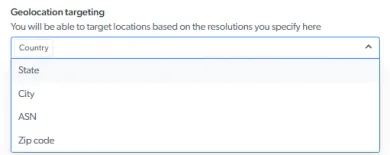
Geolocation options from Bright Data's residential configuration documentation. This is a published vendor screenshot, not our account, and the UI version isn't stated. It shows targeting levels only, not session length or rotation, and available levels can depend on the plan.
Two other options are worth a look:
- Datacenter addresses are registered to hosting networks. Prices are plan-dependent, and they suit destinations that don't care about network type. See datacenter proxies and the comparison in residential vs datacenter proxies.
- Mobile proxies exit through carrier networks, which some destinations treat differently from home broadband. If that difference matters for your target, an ISP or residential address won't substitute for it. See mobile proxies.
05How to check what you actually received
Labels on a pricing page are claims. A few checks give you evidence, though none of them amounts to a full audit.
Network indicator. Connect through the proxy and open My IP. It shows the address and network for that one request. Seeing an internet provider rather than a cloud host is consistent with an ISP or residential product. It doesn't prove where the address is hosted, whether it's exclusive to you, or that the product matches its description.
Reachability. The proxy checker tests the endpoint from its own location. A pass means the proxy answered the checker. It doesn't prove your browser or app routes through it. If the check fails, first check whether the provider uses an IP allowlist that doesn't include the checker's source address. That's a different problem from your own client path.
Behavior. Log the exit IP at the start and end of a realistic session, from the application you'll actually use, and compare it with the exit the provider says you should get:
| What you see | ISP / static | Residential sticky | Residential rotating |
|---|---|---|---|
| Same IP at start and end | Consistent with the plan | Consistent within the window, not guaranteed | Possible; pools can repeat exits |
| Different IP | Ask the vendor; also confirm the app is using the proxy | Possible if the exit dropped or the window ended | Expected in most cases |
| An IP that isn't the provider's expected exit | Check the app's proxy settings and route against the provider's documented endpoint | Same | Same |
An unchanged IP doesn't prove the setup failed, and a changed IP doesn't prove it worked. An exit in the right country or on a familiar network isn't route proof either. The useful test is whether what you see matches what the provider says your configuration should produce.
Before you buy, confirm in writing:
- whether the addresses are shared or dedicated, and for how long you keep them;
- whether and when the vendor may replace an address;
- the billing unit (per IP, per GB, or both), any traffic cap, and how the plan defines a GB;
- for sticky sessions, the documented default and maximum window;
- which protocols are supported (HTTP, HTTPS, SOCKS5). Protocol is listed separately from IP origin, so a SOCKS5 ISP address and a SOCKS5 residential exit are still different products.
06Services that document both models
The services below have catalog pages on Top Proxy. Bright Data and Oxylabs publish documentation for both ISP and residential products. Check each vendor's current plan pages for allocation, session limits, and billing units. Being listed here doesn't mean we've tested them with your target or your software.

Bright Data is a large proxy network for data collection: residential, mobile, ISP and datacenter IPs in about 195 countries. Residential traffic can be paid as you go with no subscription, and datacenter and ISP addresses come in packs from 10 IPs. Residential and mobile access requires identity verification.


What does ISP proxy mean?
Are ISP proxies the same as static residential proxies?
Is a sticky residential session the same as a static IP?
Which is better for staying logged in to one account?
Is per-IP or per-GB billing cheaper?
My IP did not change when I connected. Is the proxy broken?
Related articles
AI proxy vs LLM gateway: what is the difference?
Tell network forwarding, an API gateway, and model routing apart so you pick the layer that matches the job.
Gemini network proxy: configure and diagnose a client connection
Route google-genai through an HTTP CONNECT proxy, keep TLS on, and tell a dead hop from an API refusal without treating a tunnel as Google access.
curl proxy setup: authentication, HTTPS CONNECT and reliable checks
Set an explicit curl proxy, keep -U apart from -u, send HTTPS through CONNECT without -k, and read exit codes against the route you actually used.