
Proxy vs VPN: which one fits your task
Proxy vs VPN compared by app coverage, encryption, DNS handling and IP type, with a task matrix and a quick way to check which IP sites actually see.
Proxy vs VPN: which one fits your task
You want a different IP address, and two tools keep coming up. This guide is for people choosing between a proxy and a VPN for a real job: scraping, account work, testing ads in another country, or just browsing from a hotel network. We compare what each one covers and where each falls short. We do not hand out free keys, and Top Proxy does not sell IPs; we compare providers.
01What a proxy and a VPN actually change
Both put a server between you and the site. The site sees that server's address instead of yours. That is where the similarity ends.
A proxy works per connection. Your browser or script opens a session to the proxy and asks it to fetch a page or relay a stream. With an HTTP proxy, a plain http:// request goes to the proxy, which forwards it. For HTTPS, the client sends a CONNECT request, and the proxy opens a raw tunnel to the target host and port. That method is defined in RFC 9110, section 9.3.6. A SOCKS5 proxy, described in RFC 1928, sits a level lower. It relays TCP connections and can relay UDP through its UDP ASSOCIATE command, without caring whether the payload is web traffic, a game client, or an SSH session.
A VPN works at the network layer. It creates a virtual interface on your device, and the operating system routes IP packets into it. WireGuard, for example, describes itself as a layer 3 tunnel that encrypts packets with modern primitives and sends them over UDP. Everything your routing table points at that interface goes through the tunnel, whether or not the app knows a VPN exists.
So the honest one-line answer: a proxy changes the exit for the apps you point at it, and a VPN changes the exit for whatever traffic the OS routes into the tunnel.
02Which apps each one covers
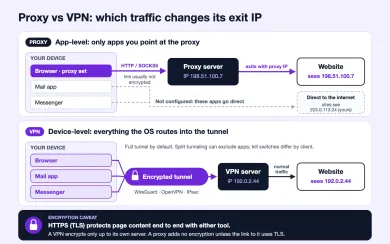
This is the difference people underestimate. Coverage decides more outcomes than encryption does.
A proxy only affects software that is configured to use it. A browser with a proxy extension sends its tabs through the proxy, but your mail client, update service, and messenger keep using your normal connection. That can be exactly what you want. Running ten browser profiles, each through its own residential exit, is a proxy job, and a VPN cannot easily do it because a single tunnel gives the whole device one exit at a time.
The catch is that plenty of software ignores proxy settings. Some mobile apps skip the Wi-Fi proxy setting on Android and iOS. Games and voice apps often open UDP streams that an HTTP proxy cannot carry at all. Browsers can also leak around a proxy: WebRTC, depending on browser and settings, may reach out to STUN servers in ways that reveal another address. If your goal is that nothing leaves the device from your home IP, a per-app proxy is the wrong shape.
A full-tunnel VPN covers the whole device by default. Split tunneling changes that, and many clients enable it for certain apps or local networks. Kill switches also vary: some clients block traffic when the tunnel drops, others fall back to your normal connection without warning. Read the client settings instead of assuming.
| Proxy | VPN | |
|---|---|---|
| Scope | Apps configured to use it | Traffic the OS routes into the tunnel |
| Typical protocols | HTTP, HTTPS via CONNECT, SOCKS5 | WireGuard, OpenVPN, IPsec |
| Encryption between you and the server | Only if the proxy link itself uses TLS | Yes, built into the tunnel |
| UDP traffic | SOCKS5 can relay it; HTTP proxies cannot | Yes |
| Many exits at once | Easy, one per profile or thread | Usually one exit per device |
| Usual IP type | Datacenter, residential, mobile, ISP | Mostly datacenter |
| Failure mode | App ignores the proxy and goes direct | Tunnel drops or split rule bypasses it |
03Encryption and DNS depend on setup
"VPNs encrypt, proxies don't" is close enough to be repeated everywhere and wrong enough to cause trouble.
A VPN encrypts the hop between your device and the VPN server. On a café Wi-Fi that matters, since the local network sees only tunnel packets. After the VPN server, your traffic goes on as normal internet traffic. If the site uses HTTPS, TLS 1.3 protects the content end to end with or without the VPN. If the site uses plain HTTP, the VPN operator and every network after it can read it. The VPN does not add encryption past its own exit.
A typical proxy link is not encrypted. But for HTTPS sites that matters less than it sounds. With CONNECT, the proxy carries a TLS session it cannot decrypt. It still sees which host and port you asked for, and the server name usually travels in clear text in the TLS handshake. Plain HTTP through a proxy is fully visible to the proxy operator. Some providers offer an HTTPS proxy endpoint, meaning the link to the proxy itself is wrapped in TLS. That hides the CONNECT target from your local network, but not from the provider.
DNS is where both tools leak in practice. With a VPN, the client usually pushes its own resolver, and WireGuard configs set it with a DNS = line. If the OS keeps using another resolver, or IPv6 traffic goes outside an IPv4-only tunnel, lookups reveal what you visit to your ISP. With SOCKS5, the client decides. RFC 1928 lets the client send a domain name and have the proxy resolve it, but many apps resolve locally first and send only the IP. In curl, that is the difference between socks5:// and socks5h://. Browsers that use DNS over HTTPS, defined in RFC 8484, send lookups to their DoH resolver, which may or may not travel through your proxy depending on configuration.
The pattern is the same in both cases. Neither tool protects you just by being switched on. The configuration does.
04Protocol and IP type are separate choices
When people compare proxies to VPNs, they often mix two different questions. One is the protocol: how your traffic reaches the exit. The other is the IP type: what kind of address the destination site sees. A site cannot tell whether you arrived through SOCKS5 or WireGuard. It can tell whether the address belongs to a hosting company, a home broadband ISP, or a mobile carrier.
| Choice | Options | What it decides | What it does not decide |
|---|---|---|---|
| Protocol | HTTP / HTTPS proxy | Web traffic via CONNECT, easy in browsers and scrapers | UDP, non-web apps |
| Protocol | SOCKS5 | Any TCP, plus UDP where the client supports it | Encryption |
| Protocol | WireGuard / OpenVPN / IPsec | Device-wide tunnel with encryption to the server | How the exit IP is classified |
| IP type | Datacenter | Speed and low price | Trust on login-heavy sites |
| IP type | Residential | Looks like a home connection, rotates | Fixed latency, unlimited traffic |
| IP type | Mobile | Carrier address shared via CGNAT, high tolerance on social apps | Low cost per GB |
| IP type | ISP, static residential | Stable home-ISP address on server hardware | Large rotation pools |
Most consumer VPNs exit through datacenter ranges, and many users share each address. That is fine for streaming a match from home while traveling, though even there results differ by service and change over time. It is a weak fit for managing several accounts, because a shared datacenter exit already carries other people's history. Proxy providers sell all four IP types. You can pick residential exits or mobile exits and connect over HTTP or SOCKS5 as your software allows.
Some VPN services offer residential or "dedicated" IPs as an add-on. Some proxy tools wrap a proxy in a WireGuard tunnel. The labels blur. Ask the two questions separately and they get easier to answer.
05Proxy or VPN: matching the tool to the task
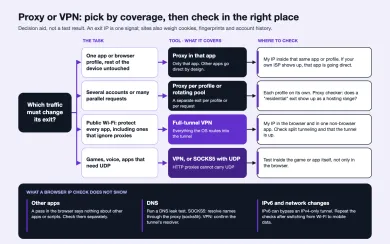
Here is how I would choose, task by task. None of these choices makes you anonymous or guarantees access to a particular site. Sites combine IP reputation with cookies, browser fingerprints, account history, and payment data, and an exit address changes only one of those signals.
| Task | Better fit | Why |
|---|---|---|
| Public Wi-Fi, protect the local hop | VPN | Encrypts all apps on the device, including those that ignore proxies |
| Web scraping, many requests | Rotating residential or datacenter proxy | Many exits in parallel, per-request control |
| Several social or marketplace accounts | Mobile or residential proxy, one per profile | Separate, stable exit per account |
| Checking ads or search results by country | Residential proxy with geo targeting | City or country choice, home-ISP addresses |
| Games, voice, apps that need UDP | VPN, or SOCKS5 with UDP support | HTTP proxies cannot carry UDP |
| One app only, rest of the device untouched | Proxy in that app | No change to other traffic |
| Hiding activity from your ISP | VPN with checked DNS settings | ISP sees only the tunnel; the VPN operator sees what the ISP saw before |
The last row deserves a second look. A VPN does not remove the party that can see your traffic metadata. It moves that visibility from your ISP to the VPN operator. Whether that is an improvement depends on whom you trust more, and on the operator's logging policy, which you usually cannot verify yourself.
If the table points you to a proxy, these providers in our catalog offer residential and mobile pools with HTTP and SOCKS5 access:

SOAX sells rotating residential and mobile proxies on a shared credit pool, with datacenter and ISP in the same plans. Builder starts at $200/mo + VAT (200 credits); Tier 1 traffic is $3/GB on Builder.

Bright Data is a large proxy network for data collection: residential, mobile, ISP and datacenter IPs in about 195 countries. Residential traffic can be paid as you go with no subscription, and datacenter and ISP addresses come in packs from 10 IPs. Residential and mobile access requires identity verification.
Compare trial terms, traffic pricing, and targeting options on each card before you commit. Plans priced per GB favor light browsing. Large scraping jobs often come out cheaper on per-port or per-IP plans.
06How to check your exit IP and leaks
Whichever tool you set up, confirm what the outside world sees. This takes two minutes and catches most mistakes.
First, open My IP in the same browser or profile that uses the proxy or VPN. The address and location should match the exit you paid for, not your home connection. If you see your own ISP, the app is going direct. For a proxy, check the extension or profile settings. For a VPN, check split tunneling and whether the tunnel is actually up.
Second, test the exit itself. Paste the proxy address into the proxy checker to see whether it responds, how fast, and how the IP is classified. A "residential" exit that the checker reports as a hosting range is worth raising with the provider.
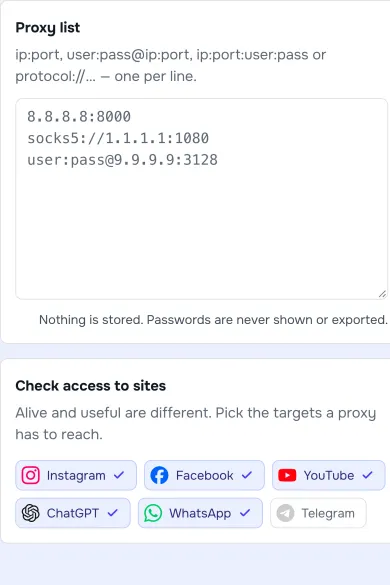
Third, look for leaks the IP page alone does not show. Run a DNS leak test and compare the resolvers it reports with what you expect. If you configured SOCKS5, make sure the client resolves names through the proxy. With a VPN, turn off IPv6 or confirm the tunnel carries it. Then repeat the check after a network change, for example switching from Wi-Fi to mobile data. Tunnels and proxy profiles often fail exactly at that moment.
If every check passes in the browser, remember that other apps on the device may still be using your normal connection. That is the proxy working as designed, not a bug.
Is a proxy or a VPN better for privacy?
Can I use a proxy and a VPN at the same time?
Does a SOCKS5 proxy encrypt traffic?
Why do some sites block my VPN but not a residential proxy?
Will a VPN hide my DNS lookups?
Related articles
Proxy bandwidth and pricing: estimate cost per successful request
What proxy bandwidth means on a bill, what uses up traffic, how retries change the real cost per successful request, and how to find the break-even between plans.
Are free proxies safe? Risks, limits and how to test one
What a free public proxy can see, why logins and speed suffer, how a public list compares with a provider trial, and how to test a proxy safely.
What is a proxy server and how does it work?
What a proxy server is, how it forwards requests, forward vs reverse proxies, protocol vs IP type, and how to check which IP a site sees.