
Python requests proxy: authentication, timeouts and errors
How to route Python requests through an HTTP or SOCKS5 proxy: the proxies dict, username/password auth, environment variables, timeouts, and what ProxyError, 407 and SSLError actually mean.
This guide is for developers who need requests to go through a proxy and survive when it misbehaves. Examples use placeholder hosts and credentials. Top Proxy doesn't sell IPs or hand out free lists; we compare the services that do.
The examples target Requests 2.34.2, the current release on PyPI, which needs Python 3.10 or newer. The proxy behavior described below comes from the Requests advanced usage docs, and the key error cases were reproduced against a local test proxy (results in the errors section).
01A minimal Python requests proxy example
Every request method takes a proxies dict. Keys are the target URL's scheme; values are the proxy URL:
import requests

proxies = {
    "http": "http://203.0.113.10:8080",
    "https": "http://203.0.113.10:8080",
}

r = requests.get("https://httpbin.org/ip", proxies=proxies, timeout=(3.05, 27))
print(r.status_code, r.json())
People trip over two things here. First, the "https" key usually points at an http:// proxy URL. That's correct: the client asks the proxy for a CONNECT tunnel and TLS runs inside it. Use https:// there only if your provider terminates TLS on the proxy port. Second, the proxy URL must include a scheme.
httpbin.org/ip returns a JSON object with an origin field, which is the address the server saw. Check it against the exit IP or range your provider documents for your plan, and note your direct address on What is my IP. An unchanged address alone doesn't prove the proxy was bypassed. Some setups exit through the same network you sit in.
A scheme://hostname key routes one exact host differently:
proxies = {
    "https": "http://203.0.113.10:8080",
    "https://api.internal.example": "http://198.51.100.5:3128",
}
02Proxy settings on a Session (and the environment trap)
A Session reuses connections and keeps defaults in one place:
session = requests.Session()
session.proxies.update(proxies)
session.get("https://httpbin.org/ip", timeout=10)
The Requests docs warn that session.proxies may not behave as you'd expect. Values set there can be overwritten by proxies from the environment (whatever urllib.request.getproxies() returns). An inherited HTTPS_PROXY can silently win. Two ways to make the choice explicit:
# Option 1: pass proxies on every call (the documented fix)
session.get(url, proxies=proxies, timeout=10)

# Option 2: stop the session from reading the environment
session.trust_env = False
session.proxies.update(proxies)
trust_env = False also stops the session reading .netrc and CA bundle variables such as REQUESTS_CA_BUNDLE.
03Python requests proxy environment variables
If you don't pass proxies at all, Requests reads the standard variables http_proxy, https_proxy, no_proxy and all_proxy. Uppercase versions work too.
export HTTP_PROXY="http://203.0.113.10:8080"
export HTTPS_PROXY="http://203.0.113.10:8080"
export NO_PROXY="localhost,127.0.0.1,.internal.example"
python my_script.py
Without NO_PROXY, calls to localhost or internal services can go through the environment proxy and time out. It only governs proxies picked up from the environment. A host matching NO_PROXY can still be proxied if you pass an explicit proxies= dict that covers it.
| Where the setting comes from | Applies to | When to use it |
|---|---|---|
proxies= argument on the request | That one call, overriding environment proxies | Scripts that must use a specific exit, e.g. per-request rotation |
Session.proxies | Every call on that session, unless the environment overrides it | Long-running clients, ideally with trust_env = False |
HTTP_PROXY / HTTPS_PROXY / ALL_PROXY | Every Requests call in the process | Third-party tools and CI where you can't edit the code |
NO_PROXY | Hosts that skip environment proxies (explicit proxies= can still cover them) | Localhost, metadata endpoints, internal APIs |
04Python requests proxy authentication (username and password)
Most paid proxies need a login. Requests supports HTTP Basic auth for proxies through the URL itself, http://user:password@host:port, in the proxies dict or in any of the environment variables:
import os
from urllib.parse import quote

user = quote(os.environ["PROXY_USER"], safe="")
password = quote(os.environ["PROXY_PASS"], safe="")
host = "gate.example-provider.com:7000"

proxy_url = f"http://{user}:{password}@{host}"
proxies = {"http": proxy_url, "https": proxy_url}
Load credentials from a secrets manager at runtime; the Requests docs call storing them in environment variables or versioned files a security risk. Percent-encode both the username and the password. Requests unquotes both parts it pulls from the URL, so any @, :, / or # in either has to go through quote(..., safe=""). Otherwise the URL can parse wrong, and the proxy never sees the credentials you meant to send.
Country or sticky-session flags in the username (user-country-us-session-abc123) are provider syntax, not a Requests feature.
You may also see requests.auth.HTTPProxyAuth in older answers. It adds a Proxy-Authorization header to the request object. In our local test it authenticated plain HTTP requests, but the HTTPS request failed with a ProxyError mentioning 407. That fits the header riding on the request rather than on the CONNECT the proxy checks. Prefer credentials in the URL.
Requests handles Basic proxy auth only. NTLM or Kerberos/Negotiate proxies need a third-party auth library or a local helper proxy.
05SOCKS5 proxies in requests
SOCKS support is an optional extra that pulls in PySocks (1.7.1 at the time of writing):
python -m pip install "requests[socks]"
After that, SOCKS URLs work in the same proxies dict, credentials included:
proxies = {
    "http": "socks5h://user:pass@203.0.113.10:1080",
    "https": "socks5h://user:pass@203.0.113.10:1080",
}
Pay attention to the h. With socks5://, DNS resolution happens on your machine and only the resulting IP goes to the proxy. With socks5h://, the proxy resolves the hostname. In our local test the SOCKS5 proxy received an IP address with socks5:// and the hostname with socks5h://. Use socks5h when you don't want your local resolver to see the lookups.
| Proxy URL scheme | Extra needed | Who resolves DNS | Typical use |
|---|---|---|---|
http:// | None | Proxy, for the hostname you request | Most paid HTTP(S) gateways |
https:// | None | Proxy | Providers that terminate TLS on the proxy port |
socks5:// | requests[socks] | Your machine | SOCKS proxies where local DNS is acceptable |
socks5h:// | requests[socks] | The proxy | SOCKS proxies, DNS lookups stay on the proxy side |
Unsure what an endpoint speaks? Run it through the proxy checker.
06Python requests proxy timeout
Requests has no default timeout, so a stalled proxy can hang a call for minutes. Always pass timeout, ideally as a (connect, read) tuple:
r = requests.get(url, proxies=proxies, timeout=(3.05, 27))
The connect value covers the TCP connection, which with a proxy means the connection to the proxy. The docs suggest a value slightly above a multiple of 3 to line up with TCP retransmission. The read value is the maximum gap between bytes from the server, not a cap on total download time. Latency depends on the provider, exit and target, so set the read value from response times measured on your actual endpoint.
For transient failures, mount an adapter with bounded retries rather than writing a loop by hand:
from requests.adapters import HTTPAdapter
from urllib3.util import Retry

retry = Retry(total=3, backoff_factor=0.5, status_forcelist=[429, 502, 503, 504])
session.mount("https://", HTTPAdapter(max_retries=retry))
session.mount("http://", HTTPAdapter(max_retries=retry))
07Python requests proxy errors: what each exception means
Order your except blocks carefully. ProxyError, SSLError and ConnectTimeout all subclass ConnectionError, and ConnectTimeout is also a Timeout. Catch the specific ones first:
from requests.exceptions import (
    ProxyError, SSLError, ConnectTimeout, ReadTimeout,
    ConnectionError, InvalidProxyURL, RequestException,
)

try:
    r = session.get(url, proxies=proxies, timeout=(3.05, 27))
    r.raise_for_status()
except ProxyError as e:
    ...  # proxy unreachable or CONNECT refused; check the message for 407
except SSLError as e:
    ...  # certificate problem; fix trust, don't disable verification
except ConnectTimeout:
    ...  # could not connect in time
except ReadTimeout:
    ...  # connected, but the server went quiet
except InvalidProxyURL:
    ...  # malformed proxy URL
except ConnectionError:
    ...  # DNS failure, reset, other network errors
except RequestException:
    ...  # anything else from requests
| Symptom | Likely cause | What to try |
|---|---|---|
ProxyError with no 407 in the message | Nothing accepting connections at that host/port, proxy down, or a network/allowlist block | Check host and port, then test the endpoint in the proxy checker; credentials are not the first suspect |
ProxyError mentioning 407 on an HTTPS URL | The CONNECT carried no credentials the proxy accepted: none sent, set only via HTTPProxyAuth, mis-encoded, wrong format, or plan inactive | Put encoded credentials in the proxy URL; confirm the username format and plan status |
| Response with status 407 on an HTTP URL | The proxy is asking for credentials; on a request sent without them this is just the challenge | Add credentials to the proxy URL; if they were already there, check encoding and format |
| Response with status 401 | The destination, not the proxy, wants authentication | Fix the site's own auth; the proxy part worked |
Requests ignores your Session.proxies | Environment proxies override them | Pass proxies= per call or set trust_env = False |
InvalidSchema: Missing dependencies for SOCKS support | requests[socks] not installed | python -m pip install "requests[socks]" |
SSLError: CERTIFICATE_VERIFY_FAILED | Intercepting proxy (Burp, corporate gateway) re-signs TLS | Point verify= or REQUESTS_CA_BUNDLE at that proxy's CA file |
| Hangs indefinitely | No timeout set | Always pass a (connect, read) tuple |
origin doesn't match the exit you expected | Proxy not applied for that scheme, NO_PROXY matched while relying on environment proxies, or a different route than you assumed | Set both http and https keys; if using env proxies, check NO_PROXY; compare with the provider's documented exit IP/range |
What a local test showed
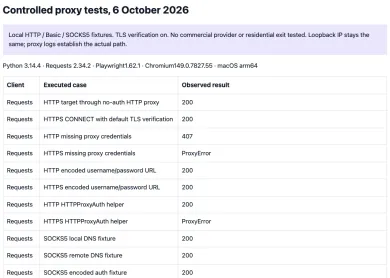
We ran these patterns against a loopback test proxy: Python 3.14.4, Requests 2.34.2, trust_env = False, timeout=(3.05, 10), TLS verification on, https://example.com/ as the HTTPS target, user demo and dummy password p@ss:/#%. This shows protocol behavior only, not any provider's speed, locations or IP quality.
| Case | HTTP target | HTTPS target |
|---|---|---|
| No proxy credentials | 407 response | ProxyError mentioning 407 |
| Percent-encoded credentials in proxy URL | 200 | 200 |
HTTPProxyAuth only | 200 | ProxyError mentioning 407 |
| Proxy port closed | ProxyError, no 407 | not tested |
| Valid proxy auth, site returns 401 | 401 response from the site | not tested |
The SOCKS5 runs with socks5://, socks5h:// and encoded SOCKS credentials all returned 200.
Certificates, Burp and intercepting proxies
Burp Suite or a corporate TLS-inspection gateway re-signs HTTPS with its own certificate authority, which Requests rejects. Trust that CA explicitly instead of switching verification off:
r = requests.get(url, proxies={"https": "http://127.0.0.1:8080"},
                 verify="/path/to/burp-ca.pem", timeout=10)
or export REQUESTS_CA_BUNDLE=/path/to/ca.pem for the whole process. Convert a DER export to PEM first. verify=False makes Requests accept any certificate and ignore hostname mismatches, which defeats TLS for everything that client sends.
08Rotating proxies in Python
Many commercial providers rotate for you behind a single gateway host. Depending on the tariff, the exit may change per request or on a session interval, and a session ID in the username usually pins one exit for a while rather than giving every call a new one. Those rules are provider settings, so check their docs. If you manage a list of endpoints yourself, pick one per request and pass it via proxies=:
import itertools

pool = itertools.cycle([
    "http://user:pass@203.0.113.10:8080",
    "http://user:pass@203.0.113.11:8080",
])

for url in urls:
    p = next(pool)
    session.get(url, proxies={"http": p, "https": p}, timeout=(3.05, 27))
Pass the proxy per call, since environment proxies can override Session.proxies. The exit type is a separate choice: datacenter, residential or mobile. Price and how a target site treats the traffic depend on the tariff, the target and the IP's reputation, not on the type label alone. Before you buy, confirm that the plan you pick supports the protocol (HTTP or SOCKS5) and auth method (login or IP allowlist) your code needs. Providers in our catalog with proxy gateways:

Bright Data is a large proxy network for data collection: residential, mobile, ISP and datacenter IPs in about 195 countries. Residential traffic can be paid as you go with no subscription, and datacenter and ISP addresses come in packs from 10 IPs. Residential and mobile access requires identity verification.

Oxylabs sells residential, datacenter and mobile proxies. Residential self-serve starts at $6/GB for 5 GB/month. Buyer payments: cards, wire, AliPay, PayPal.

SOAX sells rotating residential and mobile proxies on a shared credit pool, with datacenter and ISP in the same plans. Builder starts at $200/mo + VAT (200 credits); Tier 1 traffic is $3/GB on Builder.

Decodo (formerly Smartproxy) sells residential and datacenter proxies. Residential: $4/GB without a monthly plan, or monthly packs from $3.75/GB for 3 GB. Payments: cards, PayPal, Alipay, Google/Apple Pay, crypto (with limits).
How do I use a proxy with Python requests?
How do I add a username and password to a requests proxy?
Why does Python requests return 407 Proxy Authentication Required?
Does requests support SOCKS5 proxies?
Does requests use the HTTP_PROXY environment variable?
What timeout should I set for requests through a proxy?
Related articles
407 Proxy Authentication Required: what it means and how to fix it
Getting HTTP 407 from a proxy? Learn what Proxy Authentication Required means, then check credentials, the IP allowlist, and special characters in the password.
Playwright proxy: browser and context configuration
How to set a proxy in Playwright at browser or context level, pass credentials, use SOCKS5, bypass hosts, confirm the exit IP and fix common proxy errors.
What are residential proxies and how do they work
Residential proxies exit through consumer ISP addresses. This explains pools, sticky sessions, what sites see, and what to ask a provider before you buy.
4 min