Playwright proxy: browser and context configuration
How to set a proxy in Playwright at browser or context level, pass credentials, use SOCKS5, bypass hosts, confirm the exit IP and fix common proxy errors.
This guide is for developers who need Playwright traffic to go through a proxy, for region-specific test runs, isolated scraping sessions or geo-dependent QA. It covers the browser and context proxy option, authentication, SOCKS5 limits and debugging. We don't hand out free proxy keys, and Top Proxy doesn't sell IPs; the catalog compares providers.
01Browser-level vs context-level proxy in Playwright
The Playwright network docs say a proxy can be set globally for the entire browser or individually for each browser context. Both accept the same object: server, plus optional bypass, username and password.
| Where you set it | API | What it affects | Typical use |
|---|---|---|---|
| Browser launch | chromium.launch({ proxy }) | Every context and page in that browser | One exit for a whole test run |
| Test runner config | use: { proxy } in playwright.config.ts | Every test that uses the configured browser | CI runs pinned to one region |
| Browser context | browser.newContext({ proxy }) | Only pages in that context | Several identities or exits in one browser process |
A browser-level proxy in the library API looks like this:
import { chromium } from 'playwright';

const browser = await chromium.launch({
  proxy: {
    server: 'http://proxy.example.com:3128',
    username: process.env.PROXY_USER,
    password: process.env.PROXY_PASS,
  },
});
In Playwright Test you put the same object under use in playwright.config.ts, and every test inherits it:
import { defineConfig } from '@playwright/test';

export default defineConfig({
  use: {
    proxy: {
      server: 'http://proxy.example.com:3128',
      username: process.env.PROXY_USER,
      password: process.env.PROXY_PASS,
    },
  },
});
A context-level proxy is the more flexible option. The browser.newContext() reference describes it as network proxy settings for that context, with no proxy by default:
const browser = await chromium.launch();

const context = await browser.newContext({
  proxy: {
    server: 'http://proxy.example.com:3128',
    username: process.env.PROXY_USER,
    password: process.env.PROXY_PASS,
  },
});
const page = await context.newPage();
// ... work with the page
await context.close();
The Python API mirrors this with dictionaries:
import os
from playwright.sync_api import sync_playwright

with sync_playwright() as p:
    browser = p.chromium.launch()
    context = browser.new_context(proxy={
        "server": "http://proxy.example.com:3128",
        "username": os.environ["PROXY_USER"],
        "password": os.environ["PROXY_PASS"],
    })
    page = context.new_page()
    # ... work with the page
    context.close()
    browser.close()
Keep credentials in environment variables or your secret store. Don't hardcode them in the config or commit them.
02Server format, authentication and SOCKS5
The server field takes a URL. According to the browserType.launch() reference, both HTTP and SOCKS proxies are supported, as in http://myproxy.com:3128 or socks5://myproxy.com:3128. A value without a scheme, such as myproxy.com:3128, is treated as an HTTP proxy. If your provider gave you a SOCKS5 endpoint, the socks5:// prefix is required.
Authentication is where most "playwright proxy authentication" questions start. The username and password fields are documented as credentials for an HTTP proxy that requires authentication. The docs don't say the same for SOCKS. There's an open feature request, microsoft/playwright#10567, titled "Support socks5 proxy with authentication". It was opened in November 2021 and carries a "collecting feedback" label. In our Chromium run (below), context creation rejected a SOCKS5 proxy with credentials outright. Until the docs say otherwise, treat SOCKS5 with a username and password as unsupported in Chromium, and test other engines yourself before relying on them.
| Setup | server example | Credentials in Playwright | Status in the docs |
|---|---|---|---|
| HTTP proxy, no auth | http://host:port | Not needed | Supported |
| HTTP proxy with login | http://host:port | username, password | Supported |
| SOCKS5, no auth (e.g. IP allowlist) | socks5://host:port | Not needed | Supported |
| SOCKS5 with login | socks5://host:port | username, password | Not documented; open feature request |
What we observed in a local Chromium test
We ran the context-level options against a local test proxy and a local test page on one Mac: Playwright 1.62.1 with Chromium 149.0.7827.55, dummy credentials, bounded timeouts and TLS verification left on. Proxy logs on the test proxy showed whether a request actually went through it. This shows how Playwright and Chromium handle each setting. It doesn't measure any provider's exit IP, speed or location, and we didn't test Firefox or WebKit.
Case (Chromium, context-level proxy) → Result
- 01HTTP proxy, no authPage loaded (200); 2 proxy log events
- 02HTTP proxy with
username/password, password containing@ : / # %Page loaded (200); passed as plain strings, no URL encoding needed - 03Same proxy, credentials left out
page.gotofailed withnet::ERR_INVALID_AUTH_CREDENTIALS - 04SOCKS5, no authPage loaded (200); 3 proxy log events
- 05SOCKS5 with
username/passwordbrowser.newContextthrew "Browser does not support socks5 proxy authentication" - 06HTTP proxy with
bypass: 'localhost'Page loaded (200); 0 proxy events, so the request went direct - 07HTTPS page through the HTTP proxy, default TLS checksLoaded (200) with certificate verification on
- 08Cookie set in one context, second context openedSecond context sent no cookie
The SOCKS5 failure happened before any network traffic: the proxy logged nothing. So an authenticated SOCKS5 endpoint fails at setup in Chromium, not at the target site.
If your provider only gives you an authenticated SOCKS5 endpoint, you have three practical routes:
- Ask for an HTTP endpoint. Some providers expose the same pool over both HTTP and SOCKS5. HTTP with
username/passwordis the documented path. - Use IP allowlisting. If the provider can authorize your machine's public IP, you can drop credentials and use
socks5://host:portwithout auth. This suits fixed CI runners better than laptops on changing networks. - Run a local relay you control. A forwarder on
127.0.0.1accepts unauthenticated connections from Playwright and adds the credentials when it connects upstream. This works, but it's one more component to secure and monitor, and it sits outside Playwright.
Don't confuse proxy credentials with httpCredentials. That context option is for HTTP authentication on the target site (a 401 challenge). It doesn't authenticate you to the proxy.
03Bypassing the proxy for specific hosts
The bypass field takes a comma-separated list of domains that should connect directly. The reference gives ".com, chromium.org, .domain.com" as an example. In our Chromium test, bypass: 'localhost' sent the request to a local page directly: the proxy logged no events for it.
const context = await browser.newContext({
  proxy: {
    server: 'http://proxy.example.com:3128',
    bypass: 'localhost, 127.0.0.1, .internal.example.com',
  },
});
Typical candidates are your local dev server, internal staging hosts and asset CDNs whose content you don't need to fetch through the exit IP. Bypassed hosts see your direct connection's exit, which may be a VPN or NAT address rather than your machine's own public IP. Either way it isn't the proxy exit, so leave out anything where the exit location matters for the test.
04How to check which IP Playwright is using
Don't assume the proxy works because the page loaded. Check the address from inside the same context that runs your code, and compare it with a context that has no proxy.
-
Open an IP echo page in a direct context. Create a context without
proxyand navigate to an IP-echo endpoint you trust. This is your baseline: the address your direct connection exits from, which may be a VPN or NAT address. For a manual check in headed mode you can use Top Proxy's My IP page, which shows the address of that one request as the site saw it.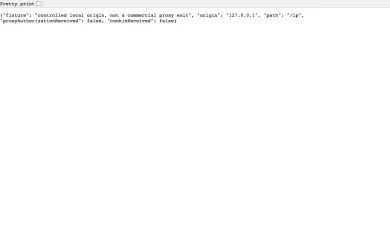 Local demonstration: a test page on the same machine, opened without a proxy. It reports the loopback address 127.0.0.1. This isn't a public IP check.
 -
Open the same page in the proxied context. Create a context with your
proxysettings and load the same URL. With a real provider, the address should be the exit you expect from that endpoint. In the local demonstration below the page reports the same 127.0.0.1, because the test proxy and the test page run on one machine. That's why a matching address on its own tells you little, and why the next step looks at the route too.
Local demonstration: the same page through a local test proxy. The address is identical by design; the proxy log in step 3 shows the route. -
Confirm the route, then the endpoint. In our local run the direct context produced 0 proxy log events and the proxied one produced 2, which shows the request really went through the proxy even though the address didn't change. With a commercial proxy you usually can't see its logs, so compare the proxied address with the exit your provider says that endpoint should give. If the direct and proxied addresses match, that alone doesn't prove a misconfiguration: pool routing, a VPN or upstream route on your network, or an unusual shared exit can produce it. Check which context created the page, the
bypasslist, and that you're using the current endpoint your provider authorized. To test the endpoint apart from your code, run its host, port and protocol through the proxy checker.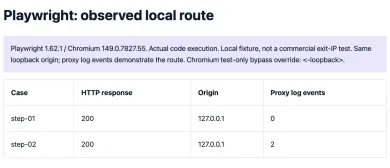 Rendered report of the local run (Playwright 1.62.1, Chromium 149). The
 <-loopback>setting shown is a Chromium test-only override that let a loopback request use the proxy; you don't need it for real sites. No commercial exit IP was tested.
Here's an automated version. IP_ECHO_URL is a placeholder for an endpoint that returns your address as plain text or JSON:
const ipEchoUrl = process.env.IP_ECHO_URL!;

async function exitIp(context: import('playwright').BrowserContext) {
  const page = await context.newPage();
  const response = await page.goto(ipEchoUrl, { timeout: 30_000 });
  const body = (await response?.text())?.trim();
  await page.close();
  return body;
}

const direct = await browser.newContext();
const proxied = await browser.newContext({
  proxy: { server: 'http://proxy.example.com:3128' },
});

console.log('direct :', await exitIp(direct));
console.log('proxied:', await exitIp(proxied));
A few caveats on reading the result. One request shows one IP at one moment. On a rotating pool the next request may come from somewhere else. The geolocation shown for an address comes from a database and can differ between services. Also, the country alone tells you little. It may not change with a proxy in your own country, and it can match by coincidence. Compare the exact address with the exit your provider documents for that endpoint.
05Context isolation, multiple proxies and rotation
The newContext() reference says a new context won't share cookies or cache with other browser contexts. In our local test, a cookie set in one context wasn't sent by a second one. That's why a per-context proxy is useful: one browser process can host several isolated sessions, each with its own exit.
const exits = [
  'http://proxy-a.example.com:3128',
  'http://proxy-b.example.com:3128',
];

for (const server of exits) {
  const context = await browser.newContext({
    proxy: {
      server,
      username: process.env.PROXY_USER,
      password: process.env.PROXY_PASS,
    },
  });
  const page = await context.newPage();
  // ... task for this exit
  await context.close();
}
Some practical rules follow from this model.
Rotate by context, not by page. The proxy is fixed when the context is created. To change exits, close the context and create a new one. Pages inside a single context share its proxy, cookies and storage.
Don't carry state across exits by accident. If you pass storageState from one context into another with a different proxy, the target site sees the same logged-in session from two addresses. Sometimes that's what you want, often it isn't.
Session parameters are best effort. Many providers encode a session or sticky ID in the proxy username. A new session ID doesn't guarantee a different IP, and a sticky session can still change before its advertised duration. Watching one idle session doesn't tell you the exact lifetime either. If your test depends on a stable exit, check the IP at the start and again before the critical step.
Close what you open. The docs recommend closing contexts with context.close() before browser.close(), so artifacts like HAR files and videos are flushed.
06Playwright proxy not working: common errors
Most failures fall into a few groups. The exact error text depends on the browser engine. The credential and SOCKS5 rows match what we saw in Chromium; the others are typical Chromium network errors we didn't reproduce.
| Symptom | Likely cause | What to check |
|---|---|---|
net::ERR_PROXY_CONNECTION_FAILED | Host or port unreachable, wrong protocol scheme | Run the endpoint through the proxy checker; confirm http:// vs socks5:// |
net::ERR_INVALID_AUTH_CREDENTIALS or HTTP 407 | Missing or wrong username/password | Environment variables are set in the runner; that credentials sit in the proxy object, not httpCredentials |
net::ERR_TUNNEL_CONNECTION_FAILED | Proxy refused the HTTPS tunnel to that host | Provider restrictions on the target; try another exit |
"Browser does not support socks5 proxy authentication" at newContext | Chromium rejects SOCKS5 with credentials | HTTP endpoint or IP allowlisting instead |
| Proxied and direct IP match | Proxy set on a different context, host in bypass, or provider routing/VPN giving the same exit | Which context created the page; the bypass list; the current authorized endpoint and its expected exit |
Certificate errors (ERR_CERT_*) | Something on the path presents its own certificate | Whether your proxy inspects TLS; fix trust, don't disable checks |
| Timeouts on some pages only | Slow or overloaded exit, heavy pages | Compare against a direct context; switch exits |
Two pieces of advice go against common forum answers.
First, keep ignoreHTTPSErrors at its default false. Turning it on hides certificate problems, including a misbehaving or intercepting proxy, and your test then passes against traffic you can't trust. If you deliberately use a TLS-inspecting proxy in a controlled environment, install its CA certificate in the trust store for that environment instead.
Second, keep retries bounded. A loop that recreates contexts until a request succeeds can burn through a metered plan and hide a dead endpoint. One or two retries with a new context, then a clear failure, is easier to debug:
async function withRetry<T>(fn: () => Promise<T>, attempts = 2): Promise<T> {
  let lastError: unknown;
  for (let i = 0; i < attempts; i++) {
    try {
      return await fn();
    } catch (error) {
      lastError = error;
    }
  }
  throw lastError;
}
07Choosing a proxy type for Playwright
The protocol and the IP type are separate decisions. Playwright cares about the protocol (HTTP or SOCKS5) and whether authentication is supported for it. The target site cares about the IP type and its reputation.
| IP type | Where it comes from | Fits Playwright tasks like |
|---|---|---|
| Datacenter | Hosting providers | Internal QA, public pages, high-volume runs where cost per request matters |
| Residential | Home ISP connections | Geo-dependent content, localized pages and prices |
| Mobile | Carrier networks | Checking how sites treat carrier IP ranges and carrier-level geo (the IP alone doesn't emulate a mobile device or browser) |
In the catalog you can compare residential, mobile and datacenter offers. For Playwright, check that the provider offers an HTTP endpoint with username and password, or IP allowlisting, since that decides how easily the proxy plugs into the proxy option. These providers are listed in the catalog. The list isn't a compatibility test, so check each provider's current docs for supported protocols and auth methods:

SOAX sells rotating residential and mobile proxies on a shared credit pool, with datacenter and ISP in the same plans. Builder starts at $200/mo + VAT (200 credits); Tier 1 traffic is $3/GB on Builder.

Bright Data is a large proxy network for data collection: residential, mobile, ISP and datacenter IPs in about 195 countries. Residential traffic can be paid as you go with no subscription, and datacenter and ISP addresses come in packs from 10 IPs. Residential and mobile access requires identity verification.

Oxylabs sells residential, datacenter and mobile proxies. Residential self-serve starts at $6/GB for 5 GB/month. Buyer payments: cards, wire, AliPay, PayPal.

Decodo (formerly Smartproxy) sells residential and datacenter proxies. Residential: $4/GB without a monthly plan, or monthly packs from $3.75/GB for 3 GB. Payments: cards, PayPal, Alipay, Google/Apple Pay, crypto (with limits).
08FAQ
How do I set a proxy in Playwright?
Does Playwright support SOCKS5 proxies?
Can I use a different proxy for each context?
How do I rotate proxies in Playwright?
Why does my Playwright proxy fail with an auth error or 407?
Is the proxy option the same as Playwright MCP?
Related articles
407 Proxy Authentication Required: what it means and how to fix it
Getting HTTP 407 from a proxy? Learn what Proxy Authentication Required means, then check credentials, the IP allowlist, and special characters in the password.
Python requests proxy: authentication, timeouts and errors
How to route Python requests through an HTTP or SOCKS5 proxy: the proxies dict, username/password auth, environment variables, timeouts, and what ProxyError, 407 and SSLError actually mean.
What are residential proxies and how do they work
Residential proxies exit through consumer ISP addresses. This explains pools, sticky sessions, what sites see, and what to ask a provider before you buy.
4 min