What is a proxy server and how does it work?
What a proxy server is, how it forwards requests, forward vs reverse proxies, protocol vs IP type, and how to check which IP a site sees.
What is a proxy server and how does it work?
This is for anyone who keeps seeing the word "proxy" and wants a plain answer: what the server in the middle does, what it changes, and what it does not. We explain the request path, the difference between protocol and IP type, and how to check the result yourself. We do not hand out free proxy lists, and Top Proxy does not sell IPs. We compare providers.
01What a proxy server is
A proxy server is a computer that makes requests on your behalf. Your browser or script sends a request to the proxy instead of to the website. The proxy opens its own connection to the site, gets the answer, and passes it back to you.
The site only talks to the proxy. So the address it records is the proxy's, not the one your internet provider gave you.
The HTTP standard, RFC 9110, puts it more formally. A proxy is a message-forwarding agent "chosen by the client, usually via local configuration rules". That phrase about the client choosing it matters more than it looks. A proxy is something you turn on in a specific app, extension, or operating system setting. Nothing reaches it unless software is pointed at it.
People use the word for a few different things, which is part of the confusion:
- the server itself, with an address and a port, such as
198.51.100.7:8080; - the service that rents you access to a pool of such servers;
- the setting in your browser or OS where you enter that address.
When this article says "proxy", it means the first one: the machine in the middle.
02How a proxy works, step by step
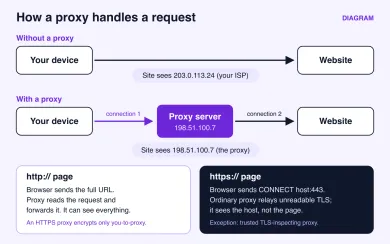
Here is what happens when your browser loads a page through a typical web proxy.
- Your browser connects to the proxy's address and port, not to the website.
- If the proxy requires a login, the browser sends your username and password, or the proxy checks that your IP is on its allowlist.
- For a plain
http://page, the browser sends the full URL to the proxy. The proxy reads the request, opens its own connection to the site, and forwards it. - For an
https://page, the browser sends aCONNECTrequest naming the host and port, for exampleexample.com:443. RFC 9110 defines this method in section 9.3.6. The proxy opens a TCP connection to that host and from then on just copies bytes in both directions. - The site answers the proxy. The proxy passes the answer back to your browser.
Step 4 is the one most explanations skip, and it changes what the proxy can see. With an ordinary CONNECT tunnel, TLS runs end to end between your browser and the website, and the browser checks the site's certificate. The proxy relays the tunnel but cannot read the pages, form fields, or cookies inside it. It does know which host and port you asked for, how much data moved, and when.
There is one exception. Some proxies, usually corporate or school filters, inspect TLS: they decrypt the traffic and re-encrypt it with their own certificate. That only works if their root certificate is installed as trusted on your device, which an admin can do on a managed machine. Through such a proxy, HTTPS traffic is readable by whoever runs it.
With plain HTTP, there is no such protection. The proxy operator can read and change everything in the request and the response. These days that is a small share of traffic, but it still exists on old sites, internal tools, and some APIs.
A proxy may also add headers that reveal you were proxied. RFC 9110 describes a Via header for forwarded HTTP messages, and RFC 7239 defines a Forwarded header that can carry the original client address to the server. Commercial proxy services usually do not add them, but that is a setting on their side, not a rule. Inside an ordinary HTTPS tunnel the proxy cannot add headers at all, because it cannot touch the encrypted request.
03Forward proxy and reverse proxy
Everything above describes a forward proxy. It works for the client. You choose it, you configure it, and it goes out to many different sites for you. This is the kind people buy from proxy providers.
A reverse proxy works for the website. It sits in front of the site's own servers and receives every visitor's request before the real application does. RFC 9110 calls it a gateway, "a.k.a. reverse proxy". Visitors usually never know it is there. Load balancers, CDN edge servers, and the Nginx instance in front of an app all play this role. They spread load, cache files, terminate TLS, and filter abusive traffic.
| Forward proxy | Reverse proxy | |
|---|---|---|
| Works for | The client | The website owner |
| Who configures it | You, in an app or the OS | The site's operators |
| Who knows it exists | You do; the site may or may not | The site does; visitors usually do not |
| What it hides | Your IP from the sites you visit | The site's internal servers from visitors |
| Typical examples | Residential or mobile proxy service, office web filter | CDN, load balancer, Nginx in front of an app |
So if a hosting guide talks about "putting a proxy in front of your app", it means a reverse proxy, and nothing in it will help you change the IP that sites see. The rest of this article is about forward proxies.
04Protocol and IP type are separate choices
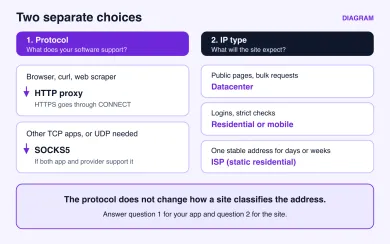
When you shop for proxies, two questions get mixed into one, and that is how people end up with the wrong product.
The first question is the protocol: how your software talks to the proxy. An HTTP proxy understands web requests and handles HTTPS through CONNECT. Browsers, curl, and most scraping libraries support it. A SOCKS5 proxy, defined in RFC 1928, works one level lower. It relays any TCP connection and, through a command called UDP ASSOCIATE, can relay UDP too. That makes it the choice for mail clients, game launchers, SSH, and other non-web software, as long as the client and the provider both support it. A plain HTTP or SOCKS5 connection to the proxy is not encrypted by itself. Some providers also offer an HTTPS proxy, where your app connects to the proxy over TLS. That encrypts the leg between you and the proxy; the leg from the proxy to the site is protected only if the site itself uses HTTPS.
The second question is the IP type: what kind of address the site sees. That depends on where the proxy's exit address comes from.
| IP type | Where the address comes from | Good for | Weak spot |
|---|---|---|---|
| Datacenter | A hosting company or cloud range | Fast bulk requests to public pages | Easy to recognise; often limited on login-heavy sites |
| Residential | A home broadband connection | Sites that expect ordinary visitors; geo checks | Price per GB; speed varies by exit |
| Mobile | A mobile carrier, often shared behind carrier NAT | Social and app platforms that trust carrier traffic | The most expensive per GB |
| ISP (static residential) | Home-ISP ranges hosted on server hardware | One stable address over days or weeks | Smaller pools, little rotation |
A site cannot see whether you reached the proxy over HTTP or SOCKS5. It sees the exit address and checks who owns it. So switching from HTTP to SOCKS5 will not turn a flagged datacenter IP into a trusted one, and buying residential IPs will not make a game client that needs UDP work over an HTTP proxy. Answer each question on its own.
Proxy services also differ in how long you keep one address. A rotating pool hands out a new exit per request or every few minutes. A sticky session keeps the same exit for a set time, which matters when a site ties your login to an IP. Ask about both before you pay.
05What a proxy is used for
Here are the common jobs, with the IP type that usually fits. None of them makes you anonymous. Sites also look at cookies, browser fingerprints, account history, and payment details, and a proxy changes only the address.
| Task | What the proxy does | Usual fit |
|---|---|---|
| Check search results or ads in another country | Gives you an exit in that country or city | Residential with geo targeting |
| Collect public data at scale | Spreads requests across many exits | Rotating datacenter or residential |
| Run several accounts on one platform | Gives each browser profile its own address | Residential or mobile, one sticky exit per profile |
| Test how your own site behaves abroad | Lets you load it as a visitor from that region | Datacenter or residential in that region |
| Office or school web filter | Inspects and blocks traffic on one network | Forward proxy run by the network admin |
| Use a single app through another IP | Changes the exit for that app only | Any type the app supports, HTTP or SOCKS5 |
For most of these jobs you will end up looking at residential proxies or mobile proxies. Datacenter IPs are cheaper and faster. I would start with them for public pages and move up only when a site starts refusing them.
If you need residential or mobile exits with both HTTP and SOCKS5 access, these providers in our catalog are a reasonable place to start:

SOAX sells rotating residential and mobile proxies on a shared credit pool, with datacenter and ISP in the same plans. Builder starts at $200/mo + VAT (200 credits); Tier 1 traffic is $3/GB on Builder.

Bright Data is a large proxy network for data collection: residential, mobile, ISP and datacenter IPs in about 195 countries. Residential traffic can be paid as you go with no subscription, and datacenter and ISP addresses come in packs from 10 IPs. Residential and mobile access requires identity verification.

Compare how each one bills before you commit. Per-GB plans suit light browsing and account work. Heavy scraping often comes out cheaper on plans priced per IP or per port. Trial terms differ too, so read the card for each service.
06What a proxy does not do
The marketing around proxies tends to promise more than the technology does. A few limits are worth knowing before you rely on one.
A proxy does not cover your whole device. Only software configured to use it goes through it. Your mail client, system updates, and many mobile apps keep using your normal connection. Some apps ignore the system proxy setting entirely.
A proxy does not encrypt your traffic by default. A plain HTTP or SOCKS5 proxy connection carries whatever your app sends as is. HTTPS sites stay encrypted because of TLS, not because of the proxy, and only while the proxy is an ordinary relay rather than a trusted TLS-inspecting one. Plain HTTP traffic is readable by the proxy operator. An HTTPS proxy encrypts the link to the proxy, but not what happens after it. A VPN is the usual tool for encrypting the link from your device.
A proxy does not hide everything about you. The operator sees which hosts you connect to and when. DNS lookups may still go to your own provider, depending on the app. With SOCKS5, some clients resolve names locally and send only the IP. In curl, the difference is socks5:// versus socks5h://. Browsers can also expose your real address through WebRTC unless it is restricted.
A free proxy is someone else's server, and you do not know who runs it. Treat anything you send through it as visible to them.
07How to check that a proxy works
Once a proxy is set up, check what sites actually see. It takes a couple of minutes and catches most mistakes.
Start in the app that uses the proxy. Open My IP in the same browser or profile. The address and country should belong to the proxy, not to your provider. If you see your own address, the app is going direct. Look at the extension, the profile settings, or whether the app reads the system proxy at all.
Then test the proxy itself. The proxy checker takes a list of proxies, one per line, as ip:port, user:pass@ip:port, ip:port:user:pass or with a socks5:// style prefix. You pick which sites each proxy has to reach, such as Instagram, YouTube or WhatsApp, and the check runs from our server.
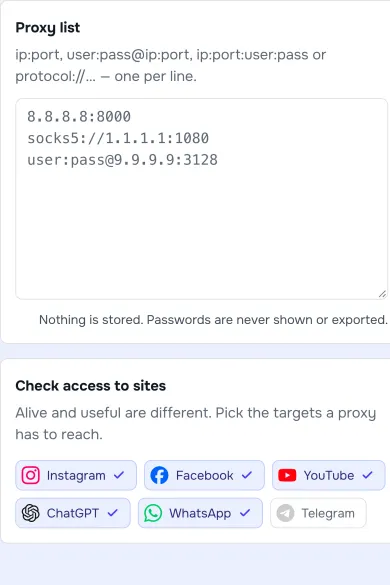
That server-side check tells you whether the proxy answers and whether it can reach the sites you picked. A proxy can be alive and still useless for your target, which is why the site choice is there. It cannot tell you how your own device is routed. That is what the My IP check in your app is for.
A few failures come up again and again:
- The connection is refused or times out. The host or port is wrong, the proxy is down, or your IP is not on the provider's allowlist.
- You get a
407 Proxy Authentication Requirederror. The login or password is wrong, or the app does not send them. - My IP still shows your address. The app is not using the proxy.
- Sites load but keep asking for captchas. The exit address has a poor reputation, so try another exit or another IP type.
Run the check again after you change networks, for example from Wi-Fi to mobile data. Proxy settings tied to one network often stop applying on the next.
What is a proxy server in simple terms?
Is a proxy the same as a VPN?
Does a proxy make me anonymous?
Can a proxy see my passwords?
Should I use an HTTP or a SOCKS5 proxy?
How do I know if my proxy is working?
Related articles
AI proxy vs LLM gateway: what is the difference?
Tell network forwarding, an API gateway, and model routing apart so you pick the layer that matches the job.
Gemini network proxy: configure and diagnose a client connection
Route google-genai through an HTTP CONNECT proxy, keep TLS on, and tell a dead hop from an API refusal without treating a tunnel as Google access.
curl proxy setup: authentication, HTTPS CONNECT and reliable checks
Set an explicit curl proxy, keep -U apart from -u, send HTTPS through CONNECT without -k, and read exit codes against the route you actually used.